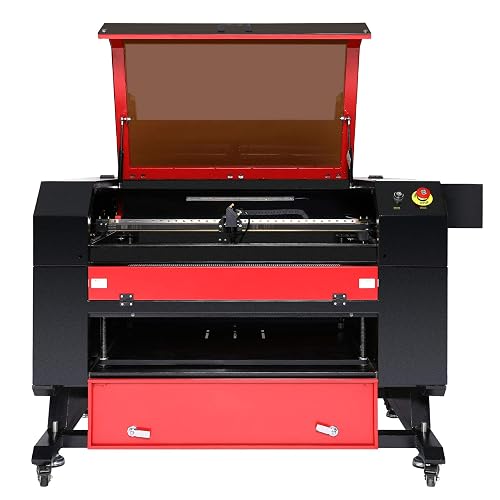
OMTech 80W CO₂ Laser Engraver: A Practical Guide
An OMTech 80W CO₂ laser engraver can be a versatile tool for small businesses, workshops, makers, and schools. With more power than many entry-level desktop machines, an 80-watt system can engrave a range of nonmetal materials and cut many of them in a single pass, depending on the material, machine configuration, and settings.
Because OMTech offers machines with different bed sizes and features, it is important to check the specifications for the exact model you are considering. Work area, autofocus, camera alignment, pass-through openings, controller, and software support can vary.
What an 80W CO₂ Laser Can Do
CO₂ lasers are commonly used to engrave and cut nonmetallic materials. An 80W machine is suited to projects such as personalized gifts, signs, display pieces, packaging, craft products, and small production runs.
Materials commonly processed include:
- Wood and plywood made for laser use
- Acrylic, including clear and colored sheets
- Leather and some fabrics
- Paper, cardboard, and certain engraving boards
- Glass, typically by surface engraving
- Rubber formulated for stamp making
Cutting performance depends on more than wattage. Material type, thickness, quality, focus, lens choice, air assist, exhaust, and the condition of the laser tube all affect results. Always consult the machine documentation and test unfamiliar materials with conservative settings.
Engraving and Cutting Performance
For engraving, the laser rapidly moves across the surface to create text, graphics, patterns, or images. Higher power can help when cutting thicker materials or completing jobs more quickly, but engraving quality also depends on focus, speed, resolution, and the material itself. A test grid is a useful way to find suitable settings before beginning a finished project.
For cutting, an 80W CO₂ laser can handle many common workshop materials, but there is no universal maximum thickness. A clean, reliable cut may require multiple passes, and the result can vary between material suppliers. Good air assist helps clear smoke and debris from the cut, while a properly aligned machine and suitable lens contribute to consistent results.
Software and Workflow
Before purchasing, confirm which controller and software are supported by the specific OMTech model. Some users prefer software such as LightBurn for designing and managing laser jobs, while other machines may use different workflows or require particular connection methods. Check compatibility, licensing requirements, file formats, and operating-system support in advance.
A typical workflow involves preparing the artwork, selecting material and job settings, focusing the laser, positioning the workpiece, and running a low-power framing or preview operation if the machine supports it. Keeping a record of tested settings can make repeat jobs more consistent.
Features to Compare
When comparing OMTech 80W models, look beyond the laser’s rated power. Consider the following:
- Work area: Make sure the bed can accommodate your typical projects.
- Bed design: Honeycomb and blade beds suit different materials and tasks.
- Cooling system: Check the manufacturer’s cooling requirements and whether a chiller is included or recommended.
- Air assist and exhaust: These help manage smoke and improve cutting conditions.
- Focus and alignment: Manual or automatic focus features can affect setup time.
- Controller and connectivity: Confirm that the machine works with your preferred software and computer setup.
- Support and replacement parts: Review documentation, warranty terms, and the availability of consumables.
Materials and Safety
Laser engraving and cutting require careful material selection and a safe operating setup. Never process PVC or vinyl, which can release highly hazardous and corrosive gases. If a material’s composition is unknown, do not assume it is safe to laser. Ask the supplier for its material safety information and verify that it is suitable for laser processing.
Operate the machine with effective exhaust ventilation, keep the work area clear of flammable debris, and never leave an active laser unattended. Fires can start quickly, especially during cutting. Follow the manufacturer’s instructions for enclosure use, cooling, maintenance, and protective equipment. A CO₂ laser beam can cause serious eye and skin injuries, so do not bypass safety features or operate the machine with its enclosure open unless the manufacturer’s approved procedure specifically allows it.
Is an OMTech 80W Laser Right for You?
An OMTech 80W CO₂ laser engraver may be a good fit if you need a larger or more capable machine than a basic desktop engraver and plan to work regularly with wood, acrylic, or other compatible materials. It can support both one-off creative projects and repeatable production, provided the machine is configured, maintained, and operated correctly.
Before choosing a model, compare the actual work area, included accessories, software compatibility, ventilation and cooling needs, and support options. Matching those details to your materials and workload is the best way to determine whether an 80W OMTech system fits your workshop.
Essential Safety and Maintenance Tips for Your OMTech 80W CO2 Laser Engraver
- Use a compatible exhaust system to vent fumes outdoors.
- Never cut or engrave PVC or vinyl; toxic gases can result.
- Keep the water chiller running and monitor coolant temperature.
- Focus the lens before each job for clean, consistent results.
- Use air assist to reduce scorching and clear debris.
- Stay with the machine while it runs, and keep a fire extinguisher nearby.
- Clean the lens and mirrors regularly, following the manual.
Use a compatible exhaust system to vent fumes outdoors.
Use an exhaust system that is compatible with your OMTech 80W CO₂ laser engraver to remove smoke, fumes, and airborne particles from the work area. Route the exhaust outdoors through an appropriate duct, keeping the path as short and unobstructed as practical, and make sure the vent does not release fumes where they could enter windows, doors, or air intakes. Follow the machine and exhaust-system manufacturers’ instructions, and never operate the laser without adequate ventilation.
Never cut or engrave PVC or vinyl; toxic gases can result.
Never cut or engrave PVC or vinyl with an OMTech 80W CO₂ laser engraver. Laser processing these materials can release toxic, corrosive gases that pose a serious health risk and may damage the machine. If you’re unsure what a material contains, check with the supplier and consult its safety information before using the laser.
Keep the water chiller running and monitor coolant temperature.
Keep the water chiller running whenever your OMTech 80W CO₂ laser is operating, and monitor the coolant temperature throughout each job. Stable cooling helps protect the laser tube from overheating and supports consistent performance. Check the recommended temperature range in your machine’s manual, maintain proper coolant levels and flow, and pause the laser if the chiller stops or the temperature moves outside the specified range.
Focus the lens before each job for clean, consistent results.
Before each job, focus the lens on the material’s surface to help your OMTech 80W CO₂ laser engraver produce sharp, consistent results. The correct focus concentrates the beam where it’s needed, improving engraving detail and helping cuts come out cleaner. Because material thickness and setup can change between projects, check the focus every time and follow your machine’s instructions for the proper focusing method.
Use air assist to reduce scorching and clear debris.
Use air assist when engraving or cutting with an OMTech 80W CO₂ laser to blow smoke and debris away from the work area. This helps keep the lens and material cleaner, reduces scorching around the edges, and can produce sharper, more consistent results. Adjust the airflow to suit the material and job, and follow the machine’s setup and safety instructions.
Stay with the machine while it runs, and keep a fire extinguisher nearby.
Always stay with your OMTech 80W CO₂ laser engraver while it is running—never leave an active job unattended, even for a moment. Laser cutting and engraving can ignite materials or create flare-ups, so keep a suitable, accessible fire extinguisher nearby and know how to use it. Follow the machine manufacturer’s safety instructions, and stop the job immediately if you notice unexpected flames, smoke, or unusual operation.
Clean the lens and mirrors regularly, following the manual.
Clean the lens and mirrors of your OMTech 80W CO₂ laser engraver regularly to help maintain beam quality and consistent results. Dust, smoke residue, and other debris can reduce performance and may damage optics if left in place. Follow the machine’s manual for the recommended cleaning schedule, supplies, and procedure, and handle optical components carefully to avoid scratching or misaligning them.
No Responses