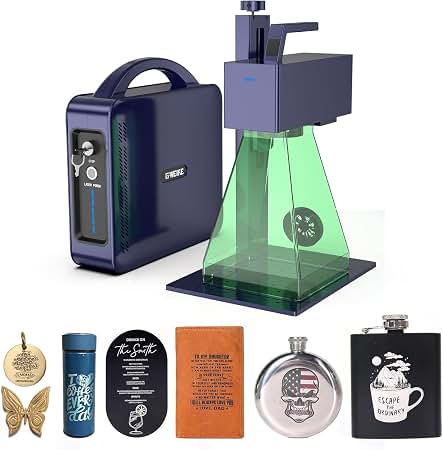
OMTech 30W Fiber Laser: A Practical Guide to Metal Engraving and Marking
An OMTech 30W fiber laser is designed for precise, permanent marking and engraving on many metals. Using a focused fiber-laser beam, it can create text, logos, serial numbers, and detailed graphics on items such as tools, nameplates, jewelry, and machine components. Its combination of compact size, digital controls, and relatively low power requirements makes it an option for small businesses, workshops, and makers looking to add metal marking to their capabilities.
What Is a 30W Fiber Laser?
A fiber laser generates a beam that is well suited to processing reflective and durable materials. “30W” refers to the laser’s rated output power. In practical terms, this power level is commonly used for surface marking and engraving, though the result depends on the material, artwork, lens, software settings, and number of passes.
OMTech offers fiber-laser systems in different configurations, so features and specifications can vary by model. Before purchasing, check the product listing and manual for details such as the work area, included lens, compatible software, focusing method, and any enclosure or safety features.
What Can an OMTech 30W Fiber Laser Do?
A 30W fiber laser can be used for a range of marking and engraving tasks, including:
- Marking logos, text, and identification codes on metal products
- Engraving serial numbers, QR codes, and barcodes
- Personalizing tools, tags, gifts, and accessories
- Adding designs to stainless steel, aluminum, brass, and other compatible metals
- Marking some plastics and coated materials, after confirming compatibility
Results vary by material. Bare metals may produce a high-contrast mark or a shallow engraved surface, while coated metals can often be marked by removing or changing the coating. A 30W machine is generally intended for marking and engraving rather than fast, deep cutting of thick metal.
Benefits of a 30W Fiber Laser
Precise, Repeatable Results
Galvo-style fiber-laser systems direct the beam using scanning mirrors, enabling quick movement across the marking field. With suitable artwork and settings, they can produce crisp details and repeatable results on batches of similar items.
Compact Footprint
Many fiber-laser markers take up less space than larger industrial equipment. This can make them practical for a dedicated workbench or small production area, subject to the specific model’s dimensions and safety requirements.
Broad Metal-Marking Capability
Fiber lasers are particularly useful for marking a variety of metals. The appropriate speed, power, frequency, and number of passes depend on the material and the desired appearance, so test settings are important.
Choosing the Right OMTech Configuration
When comparing OMTech 30W fiber-laser models, consider how and where the machine will be used. Check the marking area, included lens, focusing system, software support, workpiece clearance, and available accessories. A rotary attachment may be useful for cylindrical objects, while a larger lens may cover a broader area but can affect spot size and detail.
Also consider whether the machine is enclosed. An enclosure, interlocks, and appropriate exhaust or filtration can help manage exposure and fumes, but safety provisions differ between products. Confirm exactly what is included and what additional protective equipment or controls are required.
Getting Started: Artwork and Settings
Most marking jobs begin with preparing vector artwork or a high-resolution image in compatible software. The design is then positioned within the marking area, focused on the workpiece, and processed using settings suited to the material. A useful starting workflow is:
- Read the machine manual and confirm software and file requirements.
- Secure the workpiece and set the correct focus and marking position.
- Run a small test grid on a sample of the same material.
- Adjust speed, power, frequency, and passes to refine the mark.
- Inspect the result before processing a full batch.
Material samples and test grids help avoid wasted products and make it easier to repeat successful settings. Keep a record of settings that work well for each material and finish.
Laser Safety and Maintenance
Fiber lasers commonly use near-infrared light, which is not visible to the eye and can cause serious injury. Treat the system as hazardous equipment. Follow the manufacturer’s safety instructions, use only eyewear rated for the laser’s wavelength and optical density, and operate the machine with suitable guarding. Do not rely on ordinary glasses or an unverified enclosure for protection.
Engraving can also produce fumes or particles, depending on the material and its coating. Use suitable ventilation or filtration, and do not process unknown materials. Keep the work area clear, supervise operation, and follow the manual’s procedures for cleaning and maintenance.
Is an OMTech 30W Fiber Laser Right for You?
An OMTech 30W fiber laser may be a good fit for users who need detailed, permanent marking on metal products, personal items, or small production runs. It can offer a practical balance of precision and capability for common engraving tasks. Buyers who need deep engraving, larger work areas, specialized materials, or high-volume production should compare higher-powered systems and other configurations before deciding.
By matching the machine to the intended materials and workload—and by following proper setup and safety practices—users can make the most of an OMTech 30W fiber laser for reliable marking and engraving projects.
Essential Safety and Maintenance Tips for Operating Your OMTech 30W Fiber Laser
- Read the OMTech manual before setup or operation.
- Wear laser safety eyewear rated for your laser’s wavelength.
- Use the enclosure and keep its safety interlocks functional.
- Provide proper fume extraction, especially when marking coated materials.
- Focus the beam carefully before each job.
- Test settings on scrap material before marking the final piece.
- Clean the lens and inspect cables and connections regularly.
Read the OMTech manual before setup or operation.
Before setting up or operating an OMTech 30W fiber laser, read the manual carefully. It explains the machine’s controls, installation requirements, focusing process, software settings, maintenance, and safety procedures. Following the model-specific instructions can help prevent equipment damage, improve marking results, and reduce the risk of laser exposure or other hazards.
Wear laser safety eyewear rated for your laser’s wavelength.
Always wear laser safety eyewear specifically rated for your OMTech 30W fiber laser’s wavelength and appropriate optical density. Fiber lasers often emit invisible near-infrared light, so ordinary glasses or eyewear without verified specifications may not protect your eyes. Check the machine manual and eyewear documentation to confirm compatibility, and follow all manufacturer safety instructions whenever the laser is operating.
Use the enclosure and keep its safety interlocks functional.
Use the OMTech 30W fiber laser’s enclosure whenever you operate the machine, and keep all safety interlocks functional—never bypass or disable them. The enclosure helps contain hazardous laser radiation and can reduce exposure to sparks, debris, and fumes, while the interlocks are designed to stop operation if a door or panel is opened. Before each job, check that the enclosure closes properly and the interlocks work as described in the manufacturer’s manual.
Provide proper fume extraction, especially when marking coated materials.
Use proper fume extraction whenever operating an OMTech 30W fiber laser, especially when marking coated or painted materials. Laser processing can release fumes and fine particles that may be harmful to breathe, so use a suitable exhaust or filtration system and follow the machine manufacturer’s ventilation guidance. Avoid marking materials unless you know what they contain, and keep the work area well ventilated.
Focus the beam carefully before each job.
Before each job, carefully focus the OMTech 30W fiber laser on the workpiece to help produce sharp, consistent results. Make sure the material is positioned at the correct working distance and use the machine’s focusing method, such as its focus tool or adjustable Z-axis, as directed in the manual. Even a small change in height can affect the mark’s clarity and accuracy, especially on uneven or curved surfaces, so refocus whenever the material or setup changes.
Test settings on scrap material before marking the final piece.
Before marking your final piece with an OMTech 30W fiber laser, test your settings on a scrap piece of the same material. Small adjustments to speed, power, frequency, or the number of passes can noticeably change the mark’s depth, contrast, and clarity. A quick test helps you find the right combination, avoid damaging your finished item, and repeat successful results with confidence.
Clean the lens and inspect cables and connections regularly.
Regular maintenance helps keep an OMTech 30W fiber laser operating reliably. Clean the lens carefully using the method and materials recommended in the manufacturer’s manual, since dust or residue can affect marking quality. At the same time, inspect cables and connections for wear, looseness, or damage, and address any issues before using the machine. Always power down the laser before cleaning or checking connections, and follow the manufacturer’s safety instructions.
No Responses