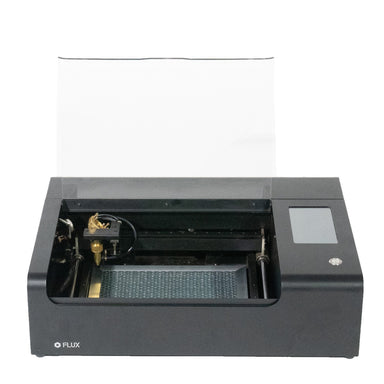
Laser Cutter for Beginners: A Practical Guide to Getting Started
A laser cutter can turn a digital design into a precisely cut or engraved object. Beginners use these machines to make signs, decorations, prototypes, gifts, model parts, and more. Choosing your first laser cutter can feel complicated, but understanding the main machine types, materials, and safety basics makes it easier to find a good fit.
How Does a Laser Cutter Work?
A laser cutter focuses a beam of light onto a material. The beam heats a small area, allowing the machine to cut through the material or mark its surface. A computer-controlled head follows a design file, so the results can be repeated with consistent detail.
Most projects begin in design software. The artwork is then sent to the laser cutter, where you set parameters such as power, speed, and the number of passes. These settings vary by machine, material, and material thickness, so beginners should start with manufacturer recommendations and test on scrap.
Common Types of Laser Cutters
Diode Laser Cutters
Diode lasers are often compact and relatively affordable, making them a popular entry point for hobbyists. They can engrave many materials and cut some thin woods and other compatible materials. Their capabilities depend on the laser’s output, the material, and the machine’s design. Some materials, such as clear acrylic, may not be suitable for many diode lasers.
CO2 Laser Cutters
CO2 lasers are commonly used for cutting and engraving materials such as wood, acrylic, paper, and leather, when those materials are confirmed safe for the machine. They’re available in a range of sizes and power levels. Compared with many desktop diode machines, CO2 systems can offer more versatility for cutting, but they may require more space, ventilation, and maintenance.
Fiber Laser Markers
Fiber lasers are generally used to mark or engrave metals and some plastics. They’re a different tool from a typical wood-and-acrylic cutter and may not be the right first choice if your projects primarily involve sheet materials such as plywood or acrylic.
What Should Beginners Look For?
- Work area: Choose a bed size that fits the projects you expect to make, while leaving room for ventilation and safe operation.
- Enclosure: An enclosed machine can help contain the beam, smoke, and debris. Check the manufacturer’s safety information and the machine’s laser classification.
- Ventilation: Laser processing can produce smoke and potentially harmful fumes. Plan for suitable exhaust or filtration before using the machine.
- Software: Look for software that supports your preferred design workflow and file types. Beginner-friendly controls can make setup less intimidating.
- Support and documentation: Clear instructions, material guidance, replacement parts, and responsive support can make learning much easier.
- Safety features: Consider features such as an interlock, emergency stop, air assist, and fire detection. Understand what each feature does and what it does not guarantee.
Choosing Materials for Your First Projects
Start with materials approved by the machine manufacturer. Common beginner projects use materials such as laser-compatible plywood, paper, cardboard, and certain types of acrylic. Material composition and coatings matter: two pieces that look alike may behave very differently under a laser.
Never cut or engrave a material unless you know what it is and have confirmed it is safe for your specific machine. Do not laser-cut PVC or vinyl; these can release corrosive and hazardous gases. Avoid unknown plastics and materials with unidentified coatings or adhesives. When in doubt, check the safety data and contact the material supplier or machine manufacturer.
Basic Steps for a First Project
- Choose a simple design. A small name tag or flat ornament is easier to troubleshoot than a detailed, multi-piece project.
- Prepare the file. Separate cut lines from engraving areas and check that the design fits the machine’s work area.
- Secure and focus the material. Follow the machine’s instructions for positioning, leveling, and focusing.
- Use a tested starting setting. Consult the manufacturer’s material guide, then run a small test on scrap. Do not assume settings from another machine will work.
- Check the work area. Confirm that the exhaust is operating, the material is approved, and no tools or debris are in the laser’s path.
- Stay with the machine. Watch the job continuously and be ready to stop it if flames, unusual smoke, or another problem occurs.
- Inspect and adjust. If the result is incomplete or too dark, change one setting at a time and test again.
Laser Cutter Safety Basics
Laser cutters can cause eye injuries, burns, fires, and exposure to hazardous fumes. Read the manual and follow the safety instructions for your exact machine and materials. Use appropriate eye protection when required, matched to the laser’s wavelength and power; ordinary sunglasses are not a substitute. Do not bypass interlocks or operate an open-frame machine without the safeguards and procedures specified by its manufacturer.
Keep a suitable fire extinguisher nearby and learn how to use it. Never leave a laser cutter running unattended, even if the machine has a camera, alarm, or automatic shutoff. Maintain the machine, clean away residue as directed, and make sure exhaust systems are working properly.
Common Beginner Mistakes
- Choosing a machine based only on its advertised laser power
- Trying to cut materials without confirming their composition
- Skipping test cuts or using settings copied from a different machine
- Ignoring ventilation, focus, or material flatness
- Leaving a running job unattended
- Expecting every laser type to cut every material
Start Small and Build Your Skills
The best first laser cutter is one that suits your materials, workspace, budget, and safety needs—not necessarily the most powerful model available. Begin with straightforward projects, follow the manufacturer’s guidance, and keep notes on settings that work. With practice and careful material selection, a laser cutter can become a versatile tool for creating precise, personalized projects.
Essential Laser Cutter Safety Tips for Beginners
- Read the machine manual before use.
- Wear eye protection suited to the laser.
- Keep the lid closed while cutting.
- Never leave the laser unattended.
- Use only materials approved for your machine.
- Avoid PVC and unknown plastics.
- Check that ventilation and exhaust are working.
- Start with low-power test cuts on scrap.
- Keep a suitable fire extinguisher nearby.
Read the machine manual before use.
Before using a laser cutter, read the machine manual from start to finish. It explains how to set up, focus, operate, and maintain your specific model, as well as which materials are safe to use. The manual also covers essential safety features and emergency procedures. Taking time to understand these instructions can help prevent injuries, equipment damage, and avoidable mistakes on your first project.
Wear eye protection suited to the laser.
Wear eye protection specifically rated for your laser’s wavelength and power whenever the manufacturer’s instructions require it. Regular glasses and sunglasses do not provide reliable protection from laser radiation, and goggles made for a different type of laser may not be suitable. Check the machine manual and the eyewear’s specifications, and never rely on eye protection as a substitute for keeping the enclosure and safety interlocks in place.
Keep the lid closed while cutting.
Keep the laser cutter lid closed whenever a job is running. The lid helps shield you from direct and reflected laser light, while also containing smoke, sparks, and debris. Never bypass safety interlocks or open the lid to check a cut in progress; pause or stop the machine first and follow the manufacturer’s instructions. Even with the lid closed, stay nearby and watch the job, since materials can ignite unexpectedly.
Never leave the laser unattended.
Never leave a laser cutter unattended while it’s running. Materials can ignite, and smoke or equipment problems can develop quickly, even during a familiar job. Stay nearby, keep the work area clear, and be ready to pause or stop the machine if you see flames, unusual smoke, or anything out of the ordinary. Before starting, review the manufacturer’s safety instructions and keep an appropriate fire extinguisher within reach.
Use only materials approved for your machine.
Use only materials approved for your specific laser cutter. Materials that look similar can contain different plastics, coatings, adhesives, or treatments, and some may release toxic or corrosive fumes when heated. Check your machine’s manual and the material supplier’s guidance before cutting or engraving, and never process unidentified materials. In particular, avoid PVC and vinyl, which can produce hazardous gases.
Avoid PVC and unknown plastics.
Avoid cutting or engraving PVC, vinyl, or plastics you can’t positively identify. Laser processing can release toxic or corrosive fumes that may harm you and damage the machine. Before using any plastic, check its exact composition and confirm it’s approved by your laser cutter’s manufacturer. If you’re unsure what a material is made of, don’t put it in the machine.
Check that ventilation and exhaust are working.
Before starting a laser cutter, check that the ventilation and exhaust system are working properly. Cutting and engraving can release smoke, particles, and potentially hazardous fumes, so make sure the exhaust is clear and directing emissions safely outside or through a suitable filtration system. Never run the machine if ventilation is blocked or malfunctioning, and follow the manufacturer’s guidance for your specific setup.
Start with low-power test cuts on scrap.
Start with low-power test cuts on scrap material before working on your final piece. A small test helps you see how the laser interacts with that specific material and gives you a chance to adjust the speed, power, and number of passes without wasting your project. Use scrap that matches the material and thickness you plan to cut, and change one setting at a time so you can learn what works. Always follow your machine’s guidelines and monitor the laser while it’s running.
Keep a suitable fire extinguisher nearby.
Keep a suitable fire extinguisher nearby whenever you use a laser cutter. Materials can ignite during cutting or engraving, so choose an extinguisher appropriate for the materials and follow the machine manufacturer’s safety guidance. Make sure it’s easy to reach, learn how to use it, and never leave the laser running unattended.
No Responses