Choosing the Best Wood for a Laser Engraver
Wood is one of the most popular materials for laser engraving and cutting. It is versatile, widely available, and suitable for projects ranging from personalized gifts to signs, models, and decorative panels. But different woods react differently to a laser. Choosing the right material can make a big difference in the appearance of your engraving, the quality of your cuts, and the time you spend adjusting settings.
What Makes a Wood Suitable for Laser Engraving?
A good laser material is consistent in thickness and composition, has a smooth surface, and produces a clear contrast when engraved. For cutting, it should also be free of hidden voids, thick glue lines, and other inconsistencies that can interrupt the beam.
Natural wood varies from piece to piece. Grain, resin, moisture, and density can all affect the result. Even two boards from the same species may engrave differently, so testing a small sample is a smart first step.
Popular Woods for Laser Projects
Plywood
Laser-grade plywood is a common choice for signs, ornaments, models, and craft projects. It is made from thin layers of wood, or veneers, bonded together. Purpose-made laser plywood is often manufactured with a consistent thickness and adhesives selected for laser processing, which can help produce cleaner results than general-purpose plywood.
Not all plywood is suitable for a laser. Construction and furniture-grade sheets may contain uneven layers, voids, or adhesives that cut poorly or release undesirable fumes. Check the product specifications and supplier guidance before use.
Basswood
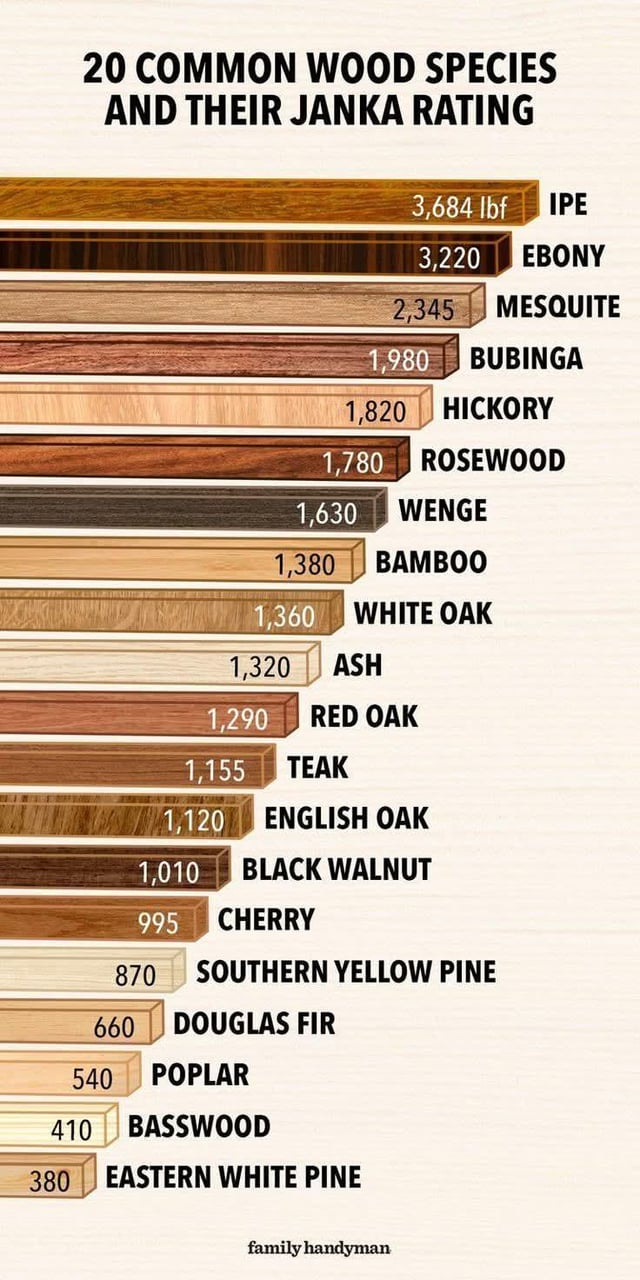
Basswood is a light, relatively soft wood that is popular for engraving, model making, and detailed craft work. Its pale color can provide noticeable contrast, and its texture is generally fine and even. Basswood is available as boards and plywood, making it a useful option for both engraving and cutting.
Birch
Birch plywood is valued for its clean appearance and smooth surface. It works well for signs, gifts, and decorative pieces, especially when a neat, light-colored finish is desired. Results depend on the plywood’s quality and adhesive, so choose a product intended for laser use when possible.
Maple
Maple is a dense hardwood with a fine grain. It can produce detailed engravings and a refined look, though it may require more power or slower settings than softer woods. Maple is often selected for small signs, plaques, and premium-looking products.
Cherry
Cherry has a warm color and attractive grain that can add character to engraved pieces. Engraving may darken the surface, creating a pleasing contrast. Since natural color and grain vary, test the exact board before producing a finished item.
Walnut
Walnut’s dark color and distinctive grain make it a popular choice for decorative projects and gifts. Engraving can create subtle tonal changes rather than the high contrast seen on pale woods. Consider the design carefully: fine details may be less visible on a dark surface.
Solid Wood or Plywood?
Solid wood offers natural grain and a distinctive appearance, but its density and moisture can vary across the board. These differences may lead to uneven engraving or cutting. Plywood is made in layers and can be more dimensionally stable, but its performance depends heavily on the veneers and bonding adhesive.
For repeatable results, look for material sold specifically for laser engraving or laser cutting. Ask the supplier about the wood species, thickness tolerance, adhesive, and any recommended processing precautions.
How to Choose Wood for Your Project
- Match the wood to the design. Pale woods tend to show dark engravings clearly, while darker woods can give a more understated effect.
- Check the surface. A flat, smooth board is easier to focus on and usually gives more consistent results.
- Consider thickness and consistency. Small variations can affect cutting depth and engraving focus.
- Look for defects. Knots, cracks, resin pockets, and voids can produce uneven results.
- Use the right material for the process. A wood that engraves beautifully may not cut efficiently, and vice versa.
- Test before making a full run. A small test grid can help you compare settings on the actual material.
Getting Clean Engraving and Cutting Results
Laser settings depend on the machine, lens, wood species, thickness, and desired finish. There is no single speed or power setting that works for every piece of wood. Follow your laser manufacturer’s instructions, then make test passes on scrap from the same sheet or board.
For engraving, check focus and use a test pattern to find the level of detail and contrast you want. For cutting, make sure the material is flat and securely positioned. If a cut does not pass through cleanly, do not assume that increasing power is always the best solution; review focus, speed, air assist, material thickness, and the machine’s recommended limits.
Wood smoke and residue can leave marks on the surface. Proper ventilation and extraction help remove smoke, while masking material may help protect the surrounding surface on some projects. Always confirm that any masking product is suitable for laser use and follow its manufacturer’s directions.
Wood and Laser Safety
Never leave a laser running unattended. Wood is combustible, and cutting or engraving can create flames, hot embers, and smoke. Keep the machine clean, use appropriate fire precautions, and follow the laser manufacturer’s safety instructions.
Use effective exhaust ventilation to remove smoke and fumes from the work area. Do not laser materials unless you know what they are made of. Some engineered wood products contain adhesives or coatings that may release hazardous fumes when heated. When in doubt, contact the supplier or choose a material with clear, reliable specifications.
Final Thoughts
The best wood for a laser engraver depends on your design, machine, and desired finish. Basswood and laser-grade plywood are practical starting points for many projects, while maple, cherry, and walnut offer distinctive looks for more decorative work. Choosing consistent, laser-compatible material—and testing it before production—can help you achieve cleaner, safer, and more predictable results.
8 Benefits of Wood for Laser Engraving and Cutting
- Easy to customize with detailed designs.
- Works well for signs, gifts, and crafts.
- Available in many species, colors, and grains.
- Can be engraved or cut for versatile projects.
- Light woods often show strong engraving contrast.
- Laser-grade plywood offers consistent results.
- Suitable for both simple and intricate designs.
- Creates a natural, warm finished look.
6 Drawbacks of Using Wood for Laser Engraving
- Wood can burn or catch fire during engraving.
- Grain and density can cause uneven results.
- Knots may leave marks or disrupt cuts.
- Plywood adhesives can produce harmful fumes.
- Smoke and residue can stain the surface.
- Natural wood varies, so settings need testing.
Easy to customize with detailed designs.
Wood is easy to customize with a laser engraver, making it ideal for designs that range from simple names and logos to intricate patterns and fine illustrations. A laser can reproduce precise details directly on the wood’s surface, helping create personalized signs, gifts, décor, and keepsakes. With the right wood and settings, even delicate lines and small lettering can produce a polished, distinctive finish.
Works well for signs, gifts, and crafts.
Wood is a versatile choice for laser engraving because it works well for signs, personalized gifts, and a wide range of crafts. Its natural grain adds warmth and character to each piece, while laser engraving makes it easy to create custom names, messages, patterns, and designs.
Available in many species, colors, and grains.
One of the biggest advantages of wood for laser engraving is its variety. It’s available in many species, colors, and grain patterns, making it easy to find a material that suits your design. Choose pale basswood for crisp contrast, richly colored walnut for a warm, refined look, or a distinctive-grained species to make each piece feel unique.
Can be engraved or cut for versatile projects.
Wood’s versatility makes it an excellent choice for laser projects: it can be engraved with detailed text, patterns, and images, or cut into custom shapes and designs. This flexibility makes it easy to create everything from personalized signs and decorative accents to ornaments, models, and functional pieces—all using the same material.
Light woods often show strong engraving contrast.
Light-colored woods are a popular choice for laser engraving because the burn marks stand out clearly against the pale surface. Woods such as basswood, birch, and maple can make text, logos, and fine details easier to see, giving designs a crisp, high-contrast finish. For the best results, test a small sample first, since the wood’s grain and finish can affect the final appearance.
Laser-grade plywood offers consistent results.
Laser-grade plywood offers consistent results because it is manufactured with more uniform layers, thickness, and bonding than many general-purpose plywoods. This consistency helps a laser engraver produce cleaner cuts and more even engravings from one sheet to the next, making it a dependable choice for projects that require accuracy and repeatability.
Suitable for both simple and intricate designs.
Wood is a versatile choice for laser engraving because it works well with both simple and intricate designs. A laser can create bold text, clean shapes, and decorative patterns, as well as fine lines and detailed artwork. With the right wood and settings, you can produce everything from straightforward labels to complex designs with crisp, attractive results.
Creates a natural, warm finished look.
Wood gives laser-engraved projects a natural, warm finished look that feels inviting and timeless. Its distinctive grain and rich tones add character to every piece, while the engraved details create a pleasing contrast against the organic surface. Whether used for signs, gifts, or home décor, wood brings a handcrafted quality that is difficult to replicate with synthetic materials.
Wood can burn or catch fire during engraving.
Wood can burn or catch fire during laser engraving because the laser’s concentrated heat is directed at a combustible material. Excessive power, slow movement, poor airflow, or unattended operation can increase the risk of scorching or flames. Always follow your laser engraver’s safety instructions, use proper ventilation, keep the machine clean, and never leave it running unattended.
Grain and density can cause uneven results.
Wood grain and density can vary across a board, causing the laser to engrave or cut some areas more deeply than others. Dense grain may resist the beam, while softer sections can burn more easily, resulting in uneven contrast, inconsistent engraving depth, or cuts that do not pass cleanly through. For more reliable results, test the material first and adjust the laser settings as needed.
Knots may leave marks or disrupt cuts.
Knots can make wood more difficult to engrave or cut cleanly because they are denser and often contain more resin than the surrounding grain. During engraving, they may burn darker and leave uneven marks; during cutting, they can slow or interrupt the laser’s progress, resulting in rough edges or incomplete cuts. For a more consistent finish, inspect the wood for knots before starting and test the material on a scrap piece.
Plywood adhesives can produce harmful fumes.
Plywood adhesives can release harmful fumes when exposed to a laser’s heat, and the type of adhesive may not always be clear from the product label. These fumes can pose health risks and may also damage equipment, so use only plywood confirmed as suitable for laser processing. Always follow the material supplier’s safety guidance and operate the laser with effective ventilation and fume extraction.
Smoke and residue can stain the surface.
During laser engraving, smoke and wood residue can settle on the material and leave dark stains or a hazy film around the design. This can be especially noticeable on light-colored or unfinished wood, where marks may reduce the project’s clean appearance. Proper ventilation, air assist, and suitable masking can help minimize residue, but it’s still wise to test your setup on a scrap piece first.
Natural wood varies, so settings need testing.
Natural wood can vary in density, grain, moisture, and resin content—even between pieces of the same species. These differences affect how the material responds to a laser, so a setting that works well on one board may produce a lighter engraving, uneven cuts, or scorching on another. Test your settings on a scrap piece from the same board before starting the finished project.
No Responses