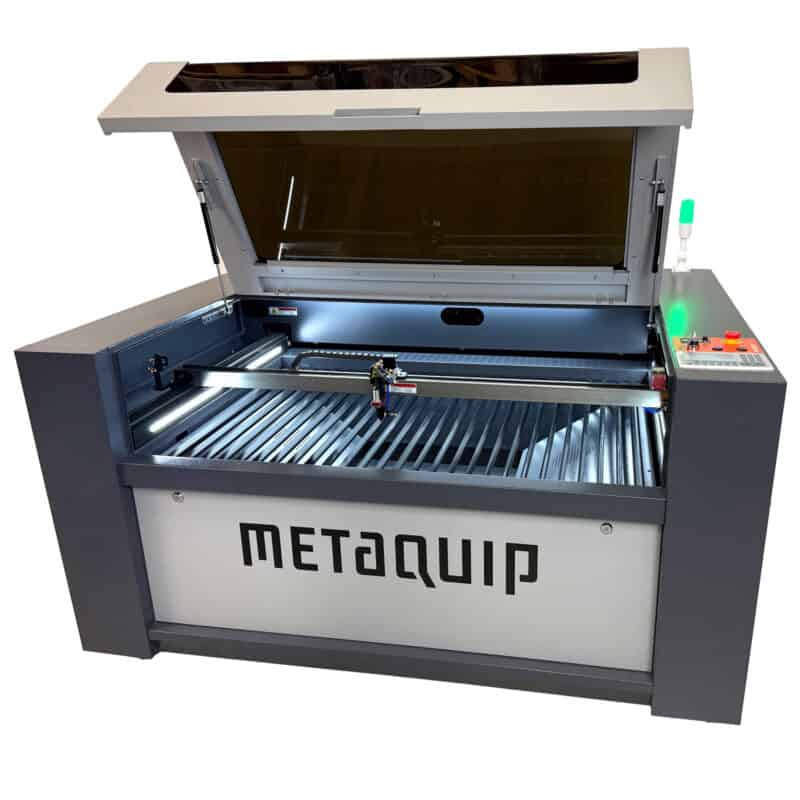
Professional Laser Cutters: A Guide to Precision, Performance, and Choosing the Right System
A professional laser cutter can turn digital designs into precise, repeatable parts, signs, prototypes, and finished products. Used in industries ranging from manufacturing and architecture to education and product design, laser cutting offers a fast, flexible way to process many materials without relying on traditional cutting tools.
Choosing a system involves more than comparing laser power. The right machine depends on the materials you plan to cut, the size and volume of your projects, the level of detail required, and the safety and support features available. This guide covers the fundamentals to help you make an informed choice.
How a Laser Cutter Works
A laser cutter focuses a high-energy beam onto a material. The beam heats a narrow area until the material melts, burns, or vaporizes. Assist gas and an exhaust system help clear debris and fumes from the cutting area. Because the beam is controlled by computer software, a laser can follow detailed paths with consistent accuracy.
Most systems use vector files to define cut paths and raster files to define engraved areas. A computer-controlled motion system moves the laser head or workpiece according to the design. Operators can adjust settings such as power, speed, and focus to suit the material and desired result.
Common Types of Professional Laser Cutters
CO₂ Laser Cutters
CO₂ laser cutters are commonly used for nonmetal materials, including wood, acrylic, paper, cardboard, leather, and some plastics. They are popular in sign making, model building, packaging, and creative production. The materials a machine can process depend on its configuration and the manufacturer’s specifications.
Fiber Laser Cutters
Fiber laser systems are often used to cut and mark metals such as stainless steel, aluminum, and carbon steel. They are common in industrial fabrication and metalworking. The required laser power and machine configuration depend on the type and thickness of the metal, along with the desired cutting speed and edge quality.
Diode Laser Systems
Diode lasers are often used for engraving and lighter-duty cutting tasks. They can be suitable for small workshops and certain hobby or production applications, but their capabilities vary significantly. Check the manufacturer’s material guidance before selecting a diode system for regular professional work.
What Can a Professional Laser Cutter Do?
Laser cutters support a broad range of applications. Businesses and makers use them to produce:
- Signage, displays, and branded products
- Prototypes and product components
- Architectural models and scale parts
- Packaging inserts and custom templates
- Metal parts, panels, and enclosures
- Engraved labels, awards, and personalized items
Laser cutting can also reduce the need for custom dies or specialized cutting tools, which may make it useful for short production runs and design changes. Results depend on the material, machine, settings, and operator experience.
Key Features to Evaluate
Work Area
The work area determines the maximum size of the material or part that can be processed in one setup. Consider the dimensions of your typical projects, as well as the space needed for loading and unloading materials. A larger work area can offer flexibility, but it may also require more floor space.
Laser Power and Cutting Capacity
Laser power affects how a system processes particular materials, but more power is not automatically better for every application. Review the manufacturer’s cutting specifications for your materials and thicknesses. If you need both fine engraving and thicker material cutting, make sure the machine can handle the full range of work.
Motion System and Accuracy
A stable frame and reliable motion system help the machine follow design paths consistently. For detailed work or repeat production, ask about positioning accuracy, repeatability, and the machine’s performance over longer jobs.
Software and File Compatibility
Check which design and machine-control programs are supported, and confirm that the system works with your preferred file formats. A clear workflow for importing designs, setting tool paths, and managing jobs can save time and reduce errors.
Exhaust and Cooling
Cutting and engraving can produce smoke, dust, and fumes. A suitable exhaust system is essential, and some machines may also require dedicated cooling equipment. Follow the manufacturer’s installation and ventilation requirements, and ensure the workspace is appropriate for the materials being processed.
Maintenance and Technical Support
Routine maintenance may include cleaning optics, checking alignment, replacing consumable parts, and inspecting the exhaust path. Before purchasing, review the service requirements, warranty terms, availability of replacement parts, and access to technical support or training.
Choosing a Laser Cutter for Your Business
Start by listing the materials, thicknesses, and part sizes you expect to process. Then estimate how often the machine will run and whether your work requires cutting, engraving, or both. These details will help narrow the choice of laser type, power level, and work area.
It is also helpful to consider the full cost of operation, not just the purchase price. Include installation, ventilation, cooling, software, maintenance, replacement parts, and operator training in your budget. If possible, request a sample cut using your own material and design. A test can reveal details such as edge quality, engraving contrast, and achievable production speed.
Safety Comes First
Professional laser cutters require appropriate safety practices. The beam can cause serious injury, and cutting may create hazardous fumes or fire risks. Use the machine’s enclosure, interlocks, ventilation, and other safety features as intended. Never bypass protective systems, and do not leave a machine operating unattended unless the manufacturer’s instructions specifically allow it.
Only process materials that the equipment manufacturer confirms are suitable. Some materials can release toxic or corrosive substances when heated. Keep the work area clean, maintain appropriate fire-safety equipment, and train operators on safe setup, operation, and shutdown procedures.
Find the Right System for the Job
A professional laser cutter can improve precision and expand what a workshop or production team is able to make. The best system is the one that matches your materials, workflow, output needs, available space, and safety requirements. By comparing the machine’s real-world capabilities and ongoing support—not just its headline specifications—you can choose equipment that serves your projects reliably over time.
Professional Laser Cutter FAQs: Costs, Profitability, Cutting Power, and Best Machines
- How much does a laser cutting machine cost?
- Can you make a living with a laser cutter?
- How much does the average laser cutter cost?
- Which laser cutting machine is best?
- How thick will a 80 watt CO2 laser cut?
- Is laser cutting profitable?
- What is the best laser cutter on the market?
- What is the most powerful laser cutter?
How much does a laser cutting machine cost?
The cost of a laser cutting machine varies widely depending on its type, power, work area, features, and intended use. Entry-level desktop models may cost a few hundred to several thousand dollars, while professional machines commonly range from several thousand to tens of thousands of dollars; high-powered industrial systems can cost significantly more. Remember to budget for additional expenses such as installation, ventilation, cooling, software, maintenance, and replacement parts. For an accurate comparison, match the machine’s specifications to the materials, thicknesses, and production volume you need.
Can you make a living with a laser cutter?
Yes, it’s possible to make a living with a laser cutter, but success depends on more than the machine itself. Many businesses earn income by producing custom signs, personalized gifts, branded products, prototypes, components, or short-run parts. A clear niche, consistent product quality, effective marketing, and reliable customer service can help build demand. Before investing, account for materials, maintenance, ventilation, software, labor, shipping, and other operating costs, and research what customers in your market are willing to pay.
How much does the average laser cutter cost?
The average cost of a laser cutter varies widely by type, power, work area, and features. Entry-level desktop models may cost a few hundred dollars, while capable small-business machines often range from several thousand to tens of thousands of dollars. Industrial systems can cost significantly more, especially when configured for high-volume production or metal cutting. Remember to budget for installation, ventilation, cooling, software, maintenance, and replacement parts, since these can add substantially to the purchase price.
Which laser cutting machine is best?
The best laser cutting machine is the one that matches your materials, project size, production volume, and budget. CO₂ lasers are often a good choice for materials such as wood and acrylic, while fiber lasers are commonly used for cutting or marking metal. Compare the machine’s work area, cutting capacity, software, safety features, maintenance needs, and manufacturer support. Before buying, check the manufacturer’s specifications for your materials and, if possible, request a sample cut to evaluate the results.
How thick will a 80 watt CO2 laser cut?
An 80-watt CO₂ laser can typically cut materials such as acrylic or wood up to about ½ inch thick in a single pass, though some machines may handle thicker stock with slower speeds or multiple passes. Actual capacity depends on the material type and quality, the machine’s optics and condition, focus, air assist, and the cut speed. For the cleanest, most reliable results, check the manufacturer’s material specifications and test the exact material before production. Never cut materials that may release hazardous fumes, such as PVC or vinyl.
Is laser cutting profitable?
Yes, laser cutting can be profitable when demand, pricing, and operating costs are well managed. Businesses can earn revenue by making custom signs, product parts, prototypes, gifts, and short-run production items, while the technology’s precision can help reduce material waste and speed up repeat jobs. Profitability depends on factors such as the cost of the laser cutter, materials, labor, maintenance, ventilation, and marketing, as well as how consistently the machine is used. Research your target market, calculate costs per job, and set prices that cover expenses and leave room for profit before investing.
What is the best laser cutter on the market?
There’s no single “best” professional laser cutter for every business—the right choice depends on the materials you process, their thickness, your production volume, and your budget. CO₂ lasers are often a strong fit for wood, acrylic, and other nonmetals, while fiber lasers are commonly used for cutting or marking metals. Compare each machine’s verified cutting capabilities, work area, software, safety features, maintenance needs, warranty, and technical support, and ask for a sample test using your own materials before making a decision.
What is the most powerful laser cutter?
The most powerful laser cutter depends on the type of laser and the materials being processed. Industrial fiber laser cutting systems are available in very high power levels—often hundreds of kilowatts for specialized applications—while high-power CO₂ systems are typically used for nonmetal materials. More power can enable faster cutting or thicker materials, but it does not automatically make a machine the best choice; material type, thickness, cut quality, work area, and operating costs all matter. Check the manufacturer’s specifications and safety requirements to find a system suited to your application.
No Responses