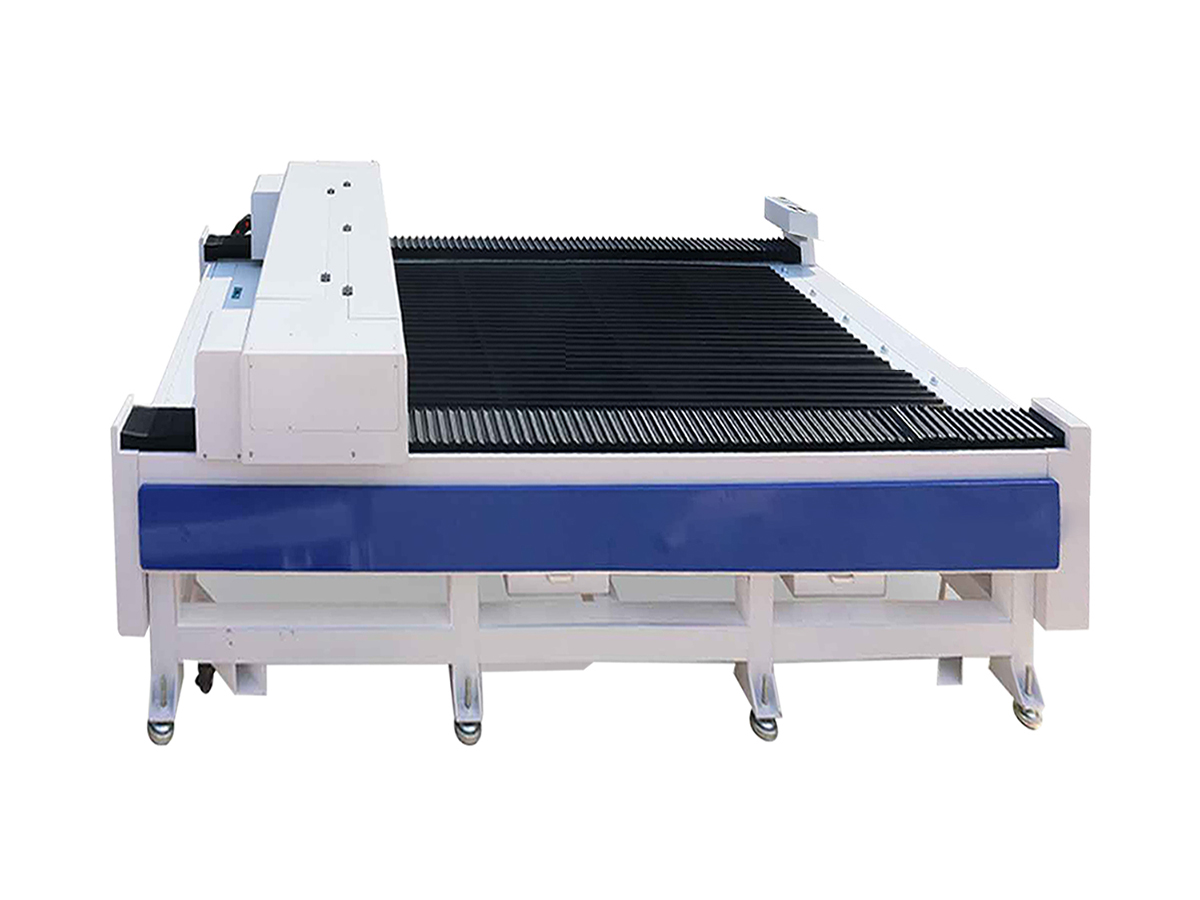
Flatbed Laser Cutter: How It Works, What It Cuts, and How to Choose One
A flatbed laser cutter is a computer-controlled machine that cuts or engraves material laid flat on a work surface. It uses a focused beam of light to follow a digital design, producing detailed shapes, clean edges, and repeatable results. Flatbed systems are used in workshops, manufacturing facilities, sign shops, schools, and creative studios.
How a Flatbed Laser Cutter Works
The material is placed on a level cutting bed, while a laser head moves across it along programmed paths. Software translates a digital file into instructions for the machine, controlling the laser’s movement, power, and speed. Depending on the material and the settings, the beam may cut all the way through, engrave the surface, or mark it.
Many machines use a gantry system to move the laser head over the work area. The flatbed supports sheet material and helps keep it in position during processing. Some models include a honeycomb or slatted bed, extraction equipment, and assist air to help manage debris, smoke, and heat.
Common Laser Types
The laser source influences which materials a machine can process:
- CO₂ lasers are commonly used for nonmetal materials such as wood, acrylic, paper, cardboard, leather, and some textiles.
- Fiber lasers are commonly used for marking and cutting metals. Their capabilities depend on the machine’s power and configuration.
- Other laser technologies may be designed for particular applications or materials, so compatibility should always be confirmed with the equipment manufacturer.
No single laser is suitable for every material. For example, some plastics can release hazardous fumes when processed, and reflective metals may require a laser source designed for that task.
Common Applications
Flatbed laser cutters are valued for their ability to process both simple shapes and intricate designs. Typical applications include:
- Cutting letters, signs, and display components
- Making prototypes, models, and product parts
- Engraving logos, text, and decorative patterns
- Producing packaging inserts and paper-based designs
- Creating craft items, gifts, and custom merchandise
- Processing selected sheet materials for manufacturing
Advantages of a Flatbed Design
A flat work surface makes it convenient to process sheet goods and repeat the same design across multiple pieces. Because the laser follows digital instructions, it can produce detailed patterns without a custom cutting die. Designs can also be adjusted in software, making the process useful for both one-off projects and small production runs.
Laser cutting is a non-contact process: the beam does not press a blade against the material. This can reduce mechanical wear on tools and help create intricate cuts, although the final result still depends on the material, machine setup, and maintenance.
What to Consider When Choosing a Machine
Before purchasing a flatbed laser cutter, consider the work you plan to do and the materials you expect to process. Important factors include:
- Work area: Choose a bed size that accommodates your usual sheet dimensions while fitting your workspace.
- Laser type and power: Match the laser source and output to the materials and thicknesses specified by the manufacturer.
- Precision and speed: Review the machine’s specifications and test samples when possible. Cutting quality can vary with material and settings.
- Software compatibility: Check supported file formats, design software, and workflow requirements.
- Ventilation and filtration: Plan for appropriate smoke extraction and filtration based on the materials being processed.
- Support and maintenance: Consider training, replacement parts, service availability, and routine upkeep.
Safety and Material Handling
Laser cutters require careful operation. Users should follow the manufacturer’s instructions, use the machine’s safety features, and never leave an active cutting job unattended. Proper ventilation is essential because processing materials can produce smoke and potentially harmful fumes. Only materials confirmed as safe for the specific machine should be used.
Operators should also keep the work area clear, inspect the machine regularly, and understand the risks of fire and laser exposure. A suitable fire-safety plan and appropriate protective measures are important parts of any laser-cutting workspace.
Conclusion
A flatbed laser cutter can be a versatile tool for cutting, engraving, and marking sheet materials. Its digital workflow supports detailed designs and repeatable production, while the flat work surface makes loading and positioning material straightforward. Choosing the right machine begins with identifying the materials, sizes, and production requirements involved—and confirming that the equipment is designed to handle them safely.
6 Essential Safety Tips for Using a Flatbed Laser Cutter
- Use only materials approved for laser cutting.
- Never cut PVC or unknown plastics.
- Keep the exhaust and air assist on.
- Secure material flat before cutting.
- Set focus and power for the material thickness.
- Stay nearby and keep a fire extinguisher accessible.
Use only materials approved for laser cutting.
Use only materials approved for laser cutting by your machine’s manufacturer. Some materials can release toxic or corrosive fumes, ignite easily, or damage the laser and its components. Check the material’s composition and your machine’s guidelines before processing it, and never assume a material is safe based on its appearance alone.
Never cut PVC or unknown plastics.
Never cut PVC or unidentified plastics with a flatbed laser cutter. PVC can release corrosive, hazardous fumes that may harm people and damage the machine, while unknown plastics may produce dangerous emissions or ignite when heated. Before processing any material, confirm exactly what it is and check the laser manufacturer’s safety guidance. If its composition is uncertain, don’t cut it.
Keep the exhaust and air assist on.
Keep the exhaust and air assist on whenever you operate a flatbed laser cutter. The exhaust helps remove smoke and fumes from the work area, while air assist directs a stream of air at the cutting point to clear debris and reduce scorching. Together, they can improve cut quality and support safer operation. Always follow the machine manufacturer’s instructions, and make sure the exhaust system is properly connected and working before starting a job.
Secure material flat before cutting.
Secure material flat before cutting to help the laser maintain consistent focus and produce clean, accurate results. Warped or shifting material can lead to uneven cuts, missed details, or damage to the workpiece. Use suitable weights, pins, or the machine’s hold-down system, keeping anything used to secure the material clear of the laser path.
Set focus and power for the material thickness.
Set the laser’s focus and power according to the material type and thickness before starting a job. Proper focus concentrates the beam where it can cut or engrave effectively, while suitable power and speed settings help produce clean results without excessive scorching or incomplete cuts. Because settings vary by machine and material, follow the manufacturer’s recommendations and test on a scrap piece first.
Stay nearby and keep a fire extinguisher accessible.
Stay nearby whenever a flatbed laser cutter is operating, and never leave an active job unattended. Materials can ignite unexpectedly, so keep a suitable fire extinguisher within easy reach and make sure you know how to use it. Follow the machine manufacturer’s safety instructions and keep the work area clear so you can respond quickly if a problem occurs.
No Responses