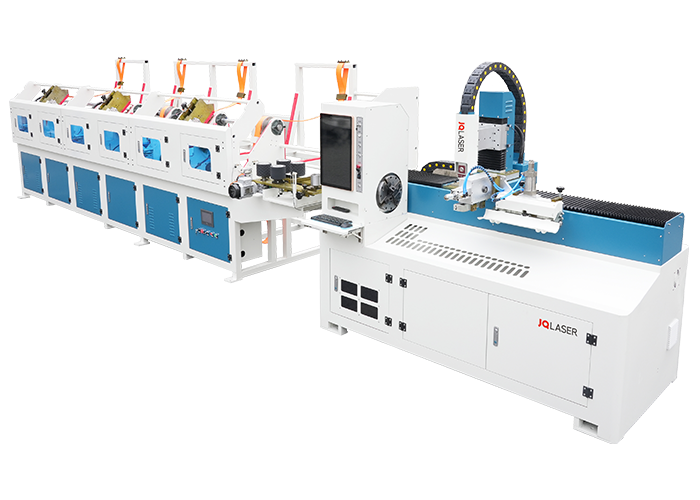
Used Laser Cutting Machines: What to Know Before You Buy
A used laser cutting machine can be a practical way to add cutting or engraving capabilities without paying the price of a new system. But a lower purchase price does not always mean a better value. The machine’s condition, capabilities, service history, and safety features all affect its long-term cost and performance.
Whether you run a fabrication shop, manage a production line, or are expanding a small business, careful research can help you choose a machine that fits your materials, workload, and budget.
What Is a Laser Cutting Machine?
A laser cutting machine uses a concentrated beam of light to cut, engrave, or mark material. Depending on the laser source and machine configuration, it may process materials such as metal, wood, acrylic, fabric, paper, or certain plastics. Common systems include:
- Fiber lasers: Often used for cutting and marking metals.
- CO2 lasers: Commonly used for nonmetal materials, including wood, acrylic, paper, and some fabrics.
- Diode lasers: Typically used for lighter-duty engraving and cutting applications.
Not every laser can safely or effectively process every material. Check the machine manufacturer’s specifications and the material supplier’s safety guidance before using a new material.
Why Consider a Used Machine?
A pre-owned laser cutter may cost less upfront than a comparable new model. It can also be available sooner, particularly when new equipment has a long lead time. In some cases, a used machine includes useful accessories, such as a rotary attachment, fume extractor, chiller, software, or spare parts.
However, used equipment may have worn components, outdated software, limited support, or a shorter remaining service life. Repairs, shipping, installation, and replacement parts can add significantly to the purchase price. Evaluate the total cost of ownership—not just the asking price.
Key Factors to Check Before Buying
Confirm That the Machine Fits Your Work
Start with the materials you plan to process, their thickness, the required cutting area, and your expected production volume. Verify the machine’s working area, laser power, cutting speed, and supported file formats. A system designed for occasional engraving may not be suitable for continuous production or thick materials.
Inspect the Laser Source and Optics
Ask about the laser source’s age, operating hours, maintenance history, and replacement cost. Inspect accessible lenses, mirrors, protective windows, and the cutting head for contamination or damage. A demonstration cut can help reveal inconsistent cutting, poor edge quality, or alignment problems.
Test the Motion System
Check the rails, belts, bearings, motors, and drive components for wear or unusual noise. The machine should move smoothly and accurately across its full working area. If possible, run a test pattern and compare the result with the machine’s stated tolerances.
Review Maintenance and Repair Records
Request service records, error logs, and details about replaced parts. Ask whether the machine has been used in a clean, climate-controlled workspace or in a dusty, high-volume environment. Consistent maintenance is a positive sign, but records should be supported by an inspection and operational test.
Check Software and Controls
Confirm that the control system and software are still supported and compatible with your computers and design workflow. Find out whether licenses, passwords, manuals, and installation files are included. Older systems may require discontinued software or specialized hardware that is difficult to replace.
Verify Safety Features
Safety systems should be complete and functional. Depending on the machine, these may include an enclosed work area, interlocks, emergency stops, warning labels, ventilation connections, and fire-prevention provisions. Never bypass safety features. Laser equipment should be operated only by trained users and in accordance with the manufacturer’s instructions and applicable safety requirements.
Plan for Extraction and Utilities
Laser cutting can produce smoke, fumes, and particles. Confirm that the machine has suitable ventilation or filtration for the materials being processed. Also check the electrical requirements, cooling system, compressed-air needs, floor space, and access for delivery. These requirements can affect installation costs and determine whether the machine is suitable for your facility.
Questions to Ask the Seller
- What materials and thicknesses has the machine processed?
- How many hours has the laser source operated?
- When was the machine last serviced?
- Are manuals, software, licenses, and accessories included?
- Can the machine be demonstrated with a test cut?
- Are replacement parts and technical support available?
- Who is responsible for rigging, shipping, installation, and calibration?
- Is there a return period, warranty, or written condition report?
Calculate the Total Cost
Before agreeing to a purchase, estimate the full cost of putting the machine into service. Include the purchase price, inspection, shipping, rigging, installation, training, software, extraction equipment, consumables, and likely repairs. You may also need to budget for replacement lenses, nozzles, filters, chillers, or a laser source.
A qualified technician can inspect the machine before purchase, especially when the equipment is expensive or the seller cannot provide a reliable demonstration. The inspection fee may help identify problems that would otherwise lead to costly downtime.
Is a Used Laser Cutting Machine Right for You?
A used laser cutter may be a good fit when the machine has been thoroughly inspected, matches your production needs, and comes with accessible parts and support. It may be a poor choice if its specifications are unclear, its safety systems are incomplete, or the cost of repairs and installation brings the total close to that of a new system.
Compare several machines, verify their condition, and request a test cut before making a decision. A careful evaluation can help you find a used laser cutting machine that delivers dependable performance and makes sense for your operation.
9 Advantages of Buying a Used Laser Cutting Machine
- Lower upfront cost than many new machines
- Faster availability in some cases
- Can expand production capacity
- May include useful accessories
- Wide range of models and capabilities
- Suitable for prototyping and small-batch work
- Can support cutting and engraving tasks
- May offer good value when well maintained
- Lets buyers match equipment to their budget
Drawbacks of Buying a Used Laser Cutting Machine
- May require costly repairs or replacement parts.
- Could have outdated software or limited technical support.
- Wear and tear may reduce cutting accuracy and reliability.
Lower upfront cost than many new machines
One of the biggest advantages of a used laser cutting machine is its lower upfront cost compared with many new models. A pre-owned system may let businesses add cutting capabilities while keeping more of their budget available for materials, training, installation, or other equipment. The actual savings depend on the machine’s condition, included accessories, and any repairs needed, so it’s wise to compare the total cost—not just the purchase price—before buying.
Faster availability in some cases
A used laser cutting machine may be available sooner than a new model, especially when the manufacturer has a long production or delivery lead time. If the equipment is already in stock and ready to ship, your business may be able to install it and begin production faster. Availability varies, so confirm the machine’s condition, delivery schedule, and installation requirements before purchasing.
Can expand production capacity
A used laser cutting machine can help your business expand production capacity without the upfront cost of buying new equipment. Adding another machine can increase output, reduce bottlenecks, and help you take on more orders while keeping your budget in check. With the right model for your materials and workflow, a pre-owned laser cutter can support growth and provide valuable extra capacity.
May include useful accessories
A used laser cutting machine may come with useful accessories that would otherwise add to the cost of a new setup. Depending on the seller, these could include a rotary attachment, fume extractor, chiller, spare parts, or design software. Check exactly what’s included and confirm that each accessory is compatible with the machine and in working condition.
Wide range of models and capabilities
One advantage of buying a used laser cutting machine is the wide range of models and capabilities available. From compact systems for engraving and light-duty cutting to industrial machines built for high-volume production, buyers can compare different laser types, work areas, power levels, and features to find a machine that fits their materials and workflow. This variety also makes it easier to match a budget with the capabilities a business actually needs.
Suitable for prototyping and small-batch work
A used laser cutting machine can be a cost-effective choice for prototyping and small-batch production. It lets businesses test designs, refine settings, and produce limited quantities without investing in a new machine right away. This flexibility can help control startup costs while providing the precision and repeatability needed to evaluate parts before moving to larger production runs.
Can support cutting and engraving tasks
A used laser cutting machine can be a versatile addition to a workshop because it may support both cutting and engraving tasks. With the right laser type and settings, operators can cut suitable materials to size, then engrave logos, labels, patterns, or other details on the same machine. This flexibility can help businesses handle a wider range of projects without investing in separate equipment.
May offer good value when well maintained
A used laser cutting machine can offer excellent value when it has been well maintained. Regular servicing and proper care can help preserve cutting accuracy, reliability, and performance, while the lower purchase price may leave more room in your budget for installation, materials, or upgrades. Before buying, review the maintenance records and arrange a thorough inspection to make sure the machine’s condition supports its asking price.
Lets buyers match equipment to their budget
A used laser cutting machine gives buyers more flexibility to match equipment to their budget. With a lower upfront cost than many new models, businesses can explore different machine sizes, power levels, and features while staying within their spending limits. This can make it easier to find a system that meets current production needs without committing to the cost of brand-new equipment.
May require costly repairs or replacement parts.
A used laser cutting machine may need costly repairs or replacement parts, especially if key components such as the laser source, cutting head, optics, or motion system are worn. These expenses can quickly reduce the savings from buying pre-owned equipment and may also lead to production delays while parts are sourced or repairs are completed. Before purchasing, ask for maintenance records, check the availability and cost of replacement parts, and arrange a professional inspection if possible.
Could have outdated software or limited technical support.
A used laser cutting machine may come with outdated software that is incompatible with newer computers, design programs, or file formats. The manufacturer may also have stopped providing updates, troubleshooting, or replacement parts for older models. This can make routine operation more difficult, delay repairs, and require extra spending on workarounds or third-party support, so check software compatibility and support availability before buying.
Wear and tear may reduce cutting accuracy and reliability.
Wear and tear can affect a used laser cutting machine’s accuracy and reliability. Worn rails, belts, bearings, optics, or other components may cause uneven cuts, inconsistent results, and more frequent downtime. Before buying, inspect the machine’s condition and maintenance history, and, if possible, run a test cut to check its performance.
No Responses