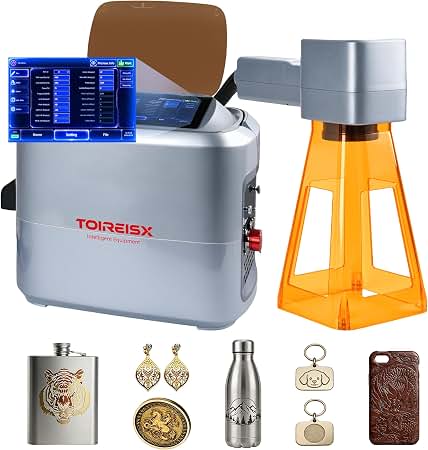
OMTech 50W Fiber Laser: Features, Uses, and What to Consider
An OMTech 50W fiber laser is designed for marking and engraving a range of materials, especially metals. With more output power than many entry-level fiber laser markers, a 50-watt system can be a practical choice for workshops, small businesses, and production environments that need detailed, repeatable results.
What Is a 50W Fiber Laser?
A fiber laser generates a focused beam through an optical fiber and directs it onto a workpiece. In a galvo-style marking system, mirrors move the beam quickly across a defined work area. This setup is well suited to adding text, serial numbers, logos, barcodes, and decorative designs to parts and products.
OMTech offers different fiber laser configurations, so the exact work area, software, accessories, and specifications can vary by model. Check the product listing and user manual for the details of the particular machine you are considering.
Materials and Common Applications
Fiber lasers are commonly used to mark or engrave metals such as stainless steel, aluminum, brass, and some coated or plated surfaces. They can also work with certain nonmetal materials, including some plastics, depending on the material’s composition and the machine settings. Results vary, so testing a sample is recommended before processing valuable or production parts.
- Engraving logos, names, and decorative designs
- Adding serial numbers, QR codes, and identification marks
- Personalizing tools, tags, and metal gifts
- Marking components for inventory or traceability
- Creating contrast marks on suitable metal surfaces
Why Consider a 50W Model?
Compared with lower-power fiber lasers, a 50W system may offer more flexibility in how quickly a job can be completed or how deeply a material can be marked. The actual result depends on factors such as the material, lens, focus, design, and laser settings. Higher wattage does not automatically mean a better finish for every task; fine detail and surface quality still depend on choosing appropriate settings and preparing the workpiece correctly.
Setup and Ease of Use
Before purchasing, review the machine’s software requirements, supported file formats, electrical needs, workspace dimensions, and included accessories. A rotary attachment may be useful for marking cylindrical objects, while different field lenses can affect the size and detail of the marking area. Confirm that any accessory is compatible with the specific OMTech model.
Plan for a stable work surface and enough room to position materials safely. New users should begin with test pieces and keep a record of successful settings for each material.
Safety Considerations
Fiber lasers can cause serious eye and skin injuries, and some materials can produce hazardous fumes when processed. Operate the system only as instructed by the manufacturer. Use the appropriate laser enclosure and wavelength-rated protective equipment, keep the work area controlled, and provide suitable fume extraction. Never process an unknown material without first checking whether it is safe to laser.
Is an OMTech 50W Fiber Laser Right for You?
An OMTech 50W fiber laser may suit users who regularly mark or engrave metal products and need a versatile machine for detailed work. It may be less appropriate if the main goal is cutting thick sheet metal or working primarily with materials better suited to a CO₂ laser. Compare the exact model’s specifications with your materials, work area, production volume, and safety requirements before making a decision.
Final Thoughts
The OMTech 50W fiber laser offers a capable platform for metal marking, product personalization, and workshop applications. Its usefulness depends on matching the machine configuration and settings to the job. Reviewing the current specifications, planning for safe operation, and testing materials in advance can help determine whether a 50W fiber laser is the right fit for your needs.
Essential Safety and Efficiency Tips for Operating an Omtech 50W Fiber Laser
- Wear eyewear rated for your laser’s wavelength and power.
- Keep the enclosure closed during operation.
- Confirm the material is safe to laser before engraving.
- Focus the beam carefully for crisp, consistent marks.
- Test settings on scrap before starting the final piece.
- Use proper ventilation to remove fumes and particles.
- Secure the workpiece so it cannot shift during marking.
- Keep the lens clean and inspect it regularly.
- Stay nearby and keep a suitable fire extinguisher accessible.
Wear eyewear rated for your laser’s wavelength and power.
Always wear laser safety eyewear specifically rated for your OMTech 50W fiber laser’s wavelength and power. Ordinary glasses or eyewear made for a different laser may not provide adequate protection. Check the machine’s manual and the eyewear’s specifications to confirm compatibility, and follow all manufacturer safety instructions whenever the laser is operating.
Keep the enclosure closed during operation.
Keep the enclosure closed whenever the OMTech 50W fiber laser is operating. The enclosure helps contain hazardous laser radiation and can reduce exposure to reflected light, smoke, and debris. Never bypass safety interlocks or open the enclosure while the laser is firing; pause the job and follow the manufacturer’s instructions before accessing the work area.
Confirm the material is safe to laser before engraving.
Before engraving with an OMTech 50W fiber laser, confirm that the material is safe to process. Some materials can release toxic fumes, catch fire, or damage the machine when exposed to a laser. Check the material’s composition and the manufacturer’s guidance, and never engrave unknown plastics, coatings, or treated surfaces. Use proper ventilation and follow the laser’s safety instructions every time.
Focus the beam carefully for crisp, consistent marks.
For crisp, consistent marks with an OMTech 50W fiber laser, take time to focus the beam accurately before starting each job. Position the material at the lens’s recommended focal distance, using the machine’s focus tool or the method specified in its manual. Keep the workpiece level and secure, since changes in height or angle can soften the mark. Before engraving a full batch, run a small test on a sample piece and adjust the focus if the result looks faint or uneven.
Test settings on scrap before starting the final piece.
Before engraving your final piece with an OMTech 50W fiber laser, test your settings on a scrap sample made from the same material. Small changes to power, speed, frequency, and focus can significantly affect the mark’s depth, contrast, and detail. A quick test helps you find the right combination, avoid damaging valuable material, and achieve more consistent results.
Use proper ventilation to remove fumes and particles.
Use proper ventilation whenever operating an OMTech 50W fiber laser to remove fumes and particles from the work area. Some materials release hazardous emissions when marked or engraved, so use a suitable fume extractor or exhaust system and follow the machine manufacturer’s safety instructions. Never laser unknown materials, and keep the workspace well ventilated to help protect both the operator and nearby equipment.
Secure the workpiece so it cannot shift during marking.
Secure the workpiece before marking to keep it from shifting and prevent uneven, misaligned, or repeated marks. Use a suitable fixture, clamp, or jig, making sure it holds the material firmly without blocking the laser’s path or damaging the surface. For small or irregularly shaped items, test the setup first to confirm the piece stays in place throughout the job.
Keep the lens clean and inspect it regularly.
Keep the OMTech 50W fiber laser lens clean and inspect it regularly to help maintain clear, consistent markings. Dust, residue, or fingerprints can interfere with the beam and affect performance, so follow the manufacturer’s instructions for cleaning and use only appropriate lens-cleaning supplies. Before inspecting or cleaning the lens, turn off the machine and let it cool as directed in the manual.
Stay nearby and keep a suitable fire extinguisher accessible.
Stay nearby and actively monitor your OMTech 50W fiber laser whenever it’s running—never leave a job unattended. Laser processing can ignite materials or create hot debris, so keep a suitable, properly rated fire extinguisher within easy reach and make sure you know how to use it. Clear flammable items from the work area, and stop the machine immediately if you notice flames, unusual smoke, or unsafe conditions.
No Responses