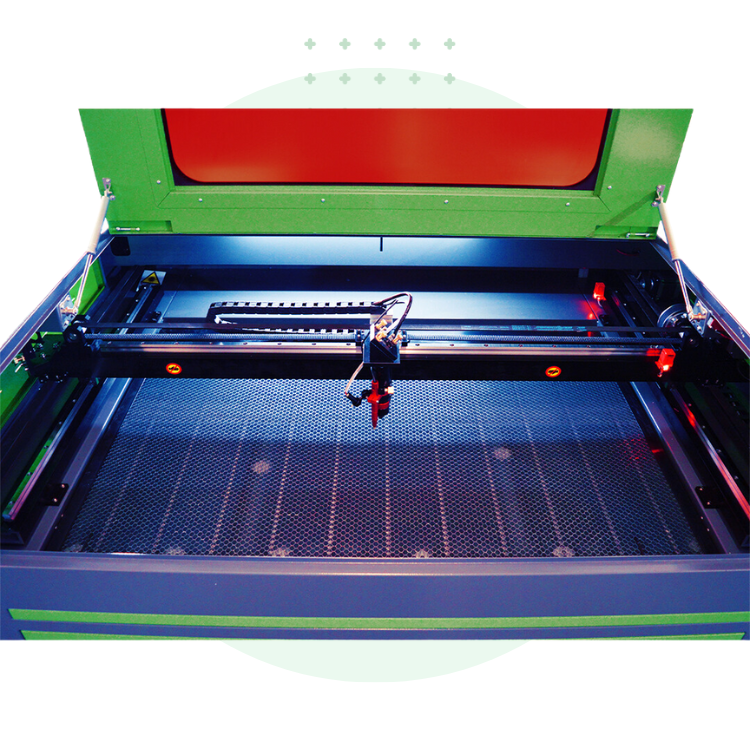
Best CO2 Laser Cutter: How to Choose the Right Machine
The best CO2 laser cutter is the one that fits your materials, workspace, budget, and production goals. A compact desktop machine may be ideal for crafts and small business orders, while a larger industrial system can handle bigger projects and longer production runs. Before choosing a model, compare the work area, laser power, software, ventilation requirements, and the support available after purchase.
This guide explains what to look for and highlights several well-known options for different types of users. Product configurations and features can change, so confirm current specifications with the manufacturer before buying.
What Is a CO2 Laser Cutter?
A CO2 laser cutter uses a gas laser to cut or engrave materials. These machines are commonly used with wood, acrylic, paper, leather, and some fabrics. They are popular with makers, sign shops, schools, and small manufacturers because they can create detailed designs without a cutting tool physically touching the material.
CO2 lasers are generally a better choice than diode lasers for cutting many nonmetal materials, especially acrylic. They do not directly cut bare metals, though some systems can mark coated or treated metals. Always check material compatibility and follow the machine and material manufacturers’ guidance.
Best CO2 Laser Cutters by Use Case
Best for Beginners: Glowforge Aura or Glowforge Pro
Glowforge machines are designed to make laser projects approachable, with a streamlined workflow and guided software experience. They may suit hobbyists and small businesses that value ease of use over extensive machine customization. Compare each model’s working area, material capabilities, and software requirements before deciding which one fits your projects.
Best Desktop Option for Growing Businesses: xTool P2 Series
The xTool P2 series is a desktop CO2 laser cutter aimed at makers and small businesses that want a more capable enclosed system. It may be a good fit for users who need a manageable footprint and features that support varied projects. Check the exact model’s work area, accessory compatibility, and ventilation needs.
Best for Value and Customization: OMTech
OMTech offers a range of CO2 laser machines, including desktop and larger cabinet-style systems. Its lineup can appeal to buyers looking for different bed sizes and power configurations at various price points. Since options differ by model, review the included components, warranty, alignment process, and availability of replacement parts.
Best for Production Work: Thunder Laser Nova Series
Thunder Laser’s Nova machines are worth considering for workshops and businesses that need a larger work area or plan to run jobs regularly. A production-oriented machine can offer valuable capacity, but it also requires adequate floor space, electrical planning, ventilation, and maintenance.
Best for Industrial Use: Boss Laser LS Series
Boss Laser’s LS series is designed for users evaluating larger-format or higher-throughput equipment. These systems may be appropriate for established shops with demanding workloads. Buyers should compare machine configuration, installation requirements, service coverage, and total operating costs—not just the advertised laser power.
What to Consider Before Buying
Work Area
Choose a bed size based on the largest pieces you expect to cut, not just the projects you make today. A larger work area can reduce the need to reposition material, but it also increases the machine’s footprint and may raise the purchase and operating costs.
Laser Power
Laser power affects cutting capability and job speed, but more power is not automatically better. The best choice depends on the materials and thicknesses you plan to process, along with the machine’s design and ventilation system. Use manufacturer-recommended settings and test unfamiliar materials carefully.
Cooling and Ventilation
CO2 laser cutters generate heat, smoke, and fumes. Many machines require a chiller or cooling system, and all cutting setups need appropriate fume extraction. Plan for ducting, filtration where needed, and a safe place to exhaust fumes. A machine that fits your budget but cannot be ventilated properly is not a suitable choice.
Software and File Compatibility
Check whether the machine works with your preferred design tools and file formats. Consider how easy it is to set power and speed, position jobs, and repeat common settings. A simple workflow can save significant time, especially for frequent production.
Safety Features
Look for a properly enclosed machine, interlocks, emergency stop controls, and clear operating instructions. Never leave a laser cutter running unattended. Keep suitable fire-safety equipment nearby, and follow the manufacturer’s guidance for supervision, maintenance, and safe materials.
Support, Warranty, and Parts
Laser cutters need maintenance, and some components may eventually need replacement. Before purchasing, review warranty terms, technical support availability, shipping costs, and access to consumable parts such as lenses, mirrors, and filters. Reliable support can matter as much as the machine’s initial price.
CO2 Laser Cutter vs. Diode Laser
A diode laser can be less expensive and may work well for light engraving or selected thin materials. A CO2 laser is often a stronger choice for cutting acrylic and many nonmetal materials. The right technology depends on the specific materials, thicknesses, and production speed you need. Neither type should be used on a material unless its manufacturer confirms that it is safe to laser process.
How Much Should You Spend?
Prices vary widely based on work area, power, construction, accessories, and service. Remember to budget for more than the machine itself. Installation, ventilation, cooling, maintenance supplies, compatible software, and training can all add to the total cost. For a business, estimate how many jobs the machine must complete to justify the investment.
Final Recommendation
For a beginner, prioritize an enclosed machine with straightforward software and accessible support. For a small business, look closely at work area, repeatability, ventilation, and parts availability. For production use, compare capacity, service coverage, and long-term operating costs across complete system configurations.
The best CO2 laser cutter is not necessarily the most powerful or the least expensive. It is the machine that safely handles your materials, fits your workspace, and reliably supports the work you plan to do.
Top 7 FAQs About Choosing the Best CO2 Laser Cutter
- What is the best CO2 laser cutter for beginners?
- Which CO2 laser cutter is best for a small business?
- How much does a good CO2 laser cutter cost?
- What materials can a CO2 laser cutter cut and engrave?
- How much laser power do I need for a CO2 laser cutter?
- What size work area should I choose for a CO2 laser cutter?
- What safety features and ventilation do I need for a CO2 laser cutter?
What is the best CO2 laser cutter for beginners?
The best CO2 laser cutter for beginners is an enclosed, easy-to-use model with clear instructions, reliable customer support, and safety features such as lid interlocks and an emergency stop. Choose a work area and laser power suited to the materials and project sizes you expect to handle, and make sure you can set up proper ventilation and cooling. A simple software workflow can also make it easier to get started, but always follow the manufacturer’s safety guidance and never leave the machine running unattended.
Which CO2 laser cutter is best for a small business?
The best CO2 laser cutter for a small business depends on the materials, project sizes, and production volume you expect. For a compact workshop, a desktop model such as the xTool P2 may offer a practical balance of capacity and footprint; businesses with larger or more frequent jobs may prefer a cabinet-style system from brands such as OMTech or Thunder Laser. Before choosing, compare the work area, power, software, ventilation and cooling needs, warranty, and access to parts and technical support.
How much does a good CO2 laser cutter cost?
A good CO2 laser cutter can cost anywhere from a few hundred dollars for a small, entry-level machine to several thousand dollars for a larger, more powerful model. Industrial systems can cost tens of thousands of dollars or more. The price depends on factors such as work area, laser power, build quality, software, warranty, and support. Remember to budget for extras like ventilation, cooling, installation, and replacement parts, since these can add significantly to the total cost.
What materials can a CO2 laser cutter cut and engrave?
A CO2 laser cutter can cut materials such as wood, acrylic, paper, cardboard, leather, and some fabrics, depending on the machine’s power and the material’s thickness. It can also engrave many of these materials, as well as glass and coated metals. CO2 lasers generally cannot cut bare metal without specialized equipment. Always verify that a material is laser-safe before processing it—never cut PVC or other materials that may release toxic or corrosive fumes—and use proper ventilation.
How much laser power do I need for a CO2 laser cutter?
The laser power you need depends on the materials you plan to cut, their thickness, and how quickly you want to work. Lower-power CO2 lasers can handle engraving and cutting thin materials, while higher-power models are generally better for thicker stock and faster production. Before choosing, check the manufacturer’s cutting specifications for your materials, and remember that power alone does not determine performance—lens choice, machine design, cooling, and ventilation matter too.
What size work area should I choose for a CO2 laser cutter?
Choose a CO2 laser cutter work area based on the largest materials and designs you expect to process, with a little extra room for future projects. A compact bed can work well for crafts and small items, while larger signs, panels, or batch production may require a wider work area. Also measure your available floor space and account for clearance, ventilation, and material handling. If you regularly work with standard sheet sizes, check whether the machine can accommodate them—or whether you’re comfortable cutting sheets down before use.
What safety features and ventilation do I need for a CO2 laser cutter?
A CO2 laser cutter should have a fully enclosed work area, a lid interlock that stops the laser when opened, an emergency stop, and clear temperature and operating controls. Use the machine only with effective fume extraction that vents outdoors or with a properly designed filtration system approved for the materials being processed. Never operate the cutter unattended, keep suitable fire-safety equipment nearby, and follow the manufacturer’s installation and maintenance instructions. Because laser cutting can release hazardous fumes, check that every material is safe to process and provide adequate ventilation for your specific setup.
No Responses