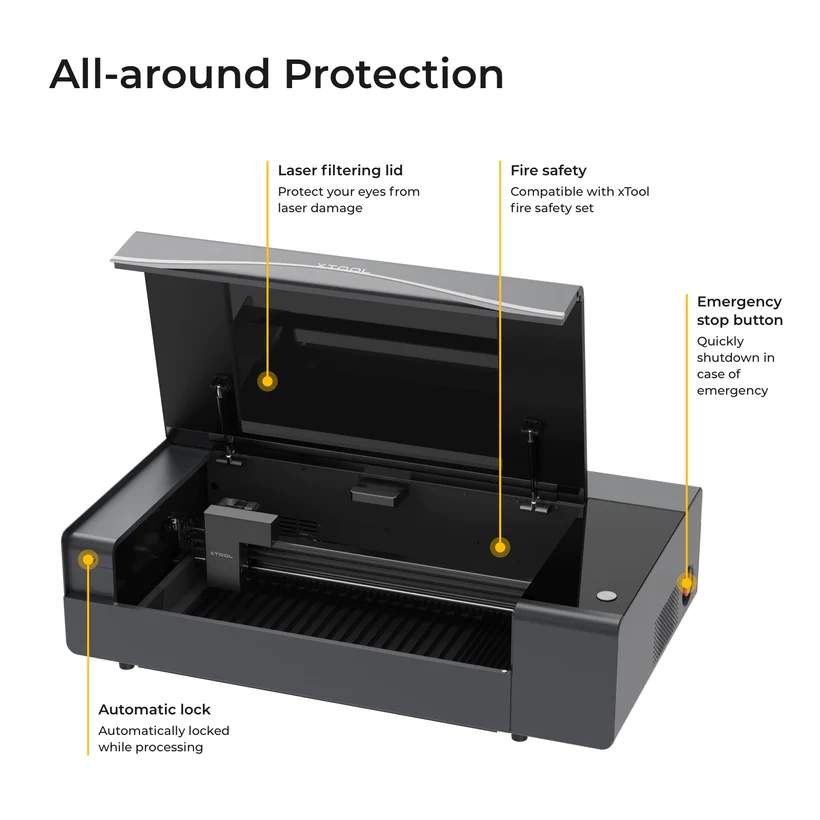
The Power of CO2 Laser Cutter Desktop Machines
CO2 laser cutter desktop machines have revolutionized the way individuals and small businesses approach cutting and engraving tasks. These compact yet powerful devices harness the precision and efficiency of CO2 laser technology, offering a versatile solution for a wide range of applications.
One of the key advantages of CO2 laser cutter desktop machines is their ability to cut through various materials with unparalleled accuracy. Whether you’re working with wood, acrylic, leather, or even metal, these machines can deliver clean and precise cuts with minimal effort.
Another benefit of CO2 laser cutter desktop machines is their user-friendly design. With intuitive software interfaces and easy-to-use controls, even beginners can quickly learn how to operate these machines effectively. This accessibility makes them ideal for hobbyists, artists, and small businesses looking to add a professional touch to their projects.
Furthermore, CO2 laser cutter desktop machines are known for their speed and efficiency. Unlike traditional cutting methods that may be time-consuming and labor-intensive, these machines can complete intricate cutting and engraving tasks in a fraction of the time. This not only increases productivity but also allows users to take on more challenging projects.
Whether you’re creating custom signage, personalized gifts, or intricate art pieces, a CO2 laser cutter desktop machine can help you bring your ideas to life with precision and finesse. The versatility, ease of use, and efficiency of these machines make them a valuable tool for anyone looking to elevate their crafting or business endeavors.
Explore the possibilities with a CO2 laser cutter desktop machine today and unlock a world of creative potential at your fingertips.
Essential Safety and Maintenance Tips for Operating a CO2 Laser Cutter Desktop
- Ensure proper ventilation in the workspace to remove smoke and fumes generated during cutting.
- Always wear appropriate safety gear, such as goggles and gloves, when operating the CO2 laser cutter.
- Regularly clean the lens of the laser cutter to maintain cutting quality and efficiency.
- Calibrate the machine regularly to ensure accurate cuts and prevent damage to materials.
- Be cautious when working with flammable materials as CO2 laser cutters can pose a fire hazard.
- Familiarize yourself with the software used to control the CO2 laser cutter for precise cutting parameters.
Ensure proper ventilation in the workspace to remove smoke and fumes generated during cutting.
To ensure a safe working environment when using a CO2 laser cutter desktop machine, it is crucial to prioritize proper ventilation in the workspace. The cutting process generates smoke and fumes that can be harmful if inhaled, making effective ventilation essential for maintaining air quality. By implementing adequate ventilation systems, such as exhaust fans or air purifiers, you can efficiently remove these byproducts and create a healthier and more comfortable workspace for both yourself and others. Prioritizing proper ventilation not only enhances safety but also promotes a more productive and enjoyable cutting experience overall.
Always wear appropriate safety gear, such as goggles and gloves, when operating the CO2 laser cutter.
When using a CO2 laser cutter desktop machine, it is crucial to prioritize safety by wearing the necessary protective gear. Always ensure that you have goggles to shield your eyes from potentially harmful laser beams and gloves to protect your hands from any heat or debris. By taking these simple precautions, you can operate the CO2 laser cutter with confidence and peace of mind, minimizing the risk of accidents and ensuring a safe working environment for yourself and those around you.
Regularly clean the lens of the laser cutter to maintain cutting quality and efficiency.
Regularly cleaning the lens of your CO2 laser cutter desktop is essential for maintaining optimal cutting quality and efficiency. Dust, debris, and residue can accumulate on the lens over time, affecting the precision of the laser beam and potentially causing defects in your cuts or engravings. By incorporating lens cleaning into your routine maintenance schedule, you can ensure that your laser cutter operates at its best, producing crisp and accurate results with every project.
Calibrate the machine regularly to ensure accurate cuts and prevent damage to materials.
Regular calibration of your CO2 laser cutter desktop machine is crucial to maintaining its precision and efficiency. By calibrating the machine consistently, you can ensure that cuts are accurate and materials are not damaged during the cutting process. Proper calibration helps optimize the performance of the machine, allowing you to achieve the desired results with every project. Make it a priority to schedule routine calibration sessions to keep your CO2 laser cutter desktop machine in top working condition and maximize its longevity.
Be cautious when working with flammable materials as CO2 laser cutters can pose a fire hazard.
When using a CO2 laser cutter desktop machine, it is crucial to exercise caution, especially when working with flammable materials. The intense heat generated by the laser beam can pose a fire hazard if not managed properly. It is essential to follow safety guidelines and ensure that the work area is well-ventilated and free of any potential ignition sources. By being mindful of the risks associated with flammable materials, users can safely harness the power of their CO2 laser cutter for precise cutting and engraving tasks.
Familiarize yourself with the software used to control the CO2 laser cutter for precise cutting parameters.
To achieve optimal results with your CO2 laser cutter desktop machine, it is essential to familiarize yourself with the software used to control the device and set precise cutting parameters. Understanding how to adjust settings such as speed, power, and focal length can significantly impact the quality and accuracy of your cuts. By mastering the software interface, you can fine-tune these parameters to meet the specific requirements of your project, ensuring clean cuts and detailed engravings every time.
No Responses