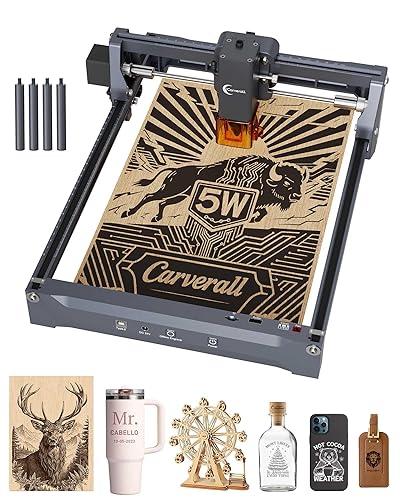
The Perfect Guide to Wood Engraving Machines for Beginners
Wood engraving is a timeless art form that allows creators to add intricate designs and personal touches to their projects. For beginners looking to delve into the world of wood engraving, investing in a quality wood engraving machine is essential.
Choosing the Right Machine
When starting out, it’s important to select a wood engraving machine that is user-friendly and versatile. Look for machines that offer easy setup, intuitive controls, and compatibility with various design software.
Key Features to Consider
- Laser Power: Opt for a machine with adjustable laser power settings to accommodate different types of wood and engraving depths.
- Engraving Area: Consider the size of the engraving area to ensure it meets your project requirements.
- Durability: Choose a machine made from sturdy materials that can withstand frequent use.
- Safety Features: Prioritize machines with safety features such as protective goggles and emergency stop buttons.
Tips for Beginners
As a beginner in wood engraving, start by practicing on scrap pieces of wood to familiarize yourself with the machine and its capabilities. Experiment with different settings and techniques to achieve varying effects.
Recommended Wood Engraving Machines for Beginners
There are several reputable brands that offer wood engraving machines tailored for beginners, including Glowforge, Ortur Laser Master, and NEJE Master. These machines combine ease of use with precision engraving capabilities, making them ideal choices for those new to the craft.
Conclusion
A wood engraving machine can open up a world of creative possibilities for beginners eager to explore this art form. By selecting the right machine, learning key techniques, and practicing regularly, aspiring wood engravers can hone their skills and create stunning works of art on various wooden surfaces.
8 Essential FAQs for Beginners Using Wood Engraving Machines
- 1. What is a wood engraving machine and how does it work?
- 2. What are the key features to look for in a wood engraving machine for beginners?
- 3. How do I choose the right laser power settings for different types of wood?
- 4. Can a beginner use design software with a wood engraving machine?
- 5. Are there safety precautions I should take when operating a wood engraving machine?
- 6. What are some common mistakes beginners make when using a wood engraving machine?
- 7. How can I practice and improve my skills with a wood engraving machine as a beginner?
- 8. Which brands offer reliable and user-friendly wood engraving machines for beginners?
1. What is a wood engraving machine and how does it work?
A wood engraving machine is a specialized tool used to etch designs, patterns, or text onto wooden surfaces with precision and accuracy. Typically equipped with a laser or rotary engraving mechanism, these machines operate by directing a focused beam of light or cutting tool onto the wood, removing material to create the desired engraving. The process involves translating digital designs into instructions that guide the machine’s movements, allowing users to customize their engravings with intricate details and varying depths. Wood engraving machines offer beginners a versatile and efficient way to add personalization and artistic flair to their woodworking projects.
2. What are the key features to look for in a wood engraving machine for beginners?
When considering a wood engraving machine for beginners, it’s crucial to focus on key features that can enhance the user experience and facilitate skill development. Some essential aspects to look for include adjustable laser power settings to accommodate different wood types, an adequate engraving area for various project sizes, durable construction for long-term use, and important safety features like protective goggles and emergency stop buttons. By prioritizing these features, beginners can ensure they have a reliable and user-friendly wood engraving machine that supports their creative journey effectively.
3. How do I choose the right laser power settings for different types of wood?
When selecting the appropriate laser power settings for different types of wood in wood engraving, beginners should consider the density and hardness of the wood. Softer woods like pine or cedar may require lower laser power settings to prevent burning or charring, while harder woods such as oak or maple may need higher power settings to achieve a deep and precise engraving. It is recommended to conduct test engravings on small scraps of the wood material to determine the optimal laser power settings before embarking on your main project. Experimenting with various power levels and observing the results will help beginners find the perfect balance between achieving desired engraving depth and maintaining the integrity of the wood surface.
4. Can a beginner use design software with a wood engraving machine?
Yes, beginners can use design software with a wood engraving machine. Many wood engraving machines are compatible with popular design software such as Adobe Illustrator, CorelDRAW, and Inkscape, making it easy for users to create custom designs and patterns for engraving. While learning to navigate design software may require some practice, most manufacturers provide tutorials and resources to help beginners get started. By familiarizing themselves with design software and experimenting with different tools and features, beginners can unleash their creativity and personalize their wood engraving projects with unique designs.
5. Are there safety precautions I should take when operating a wood engraving machine?
When operating a wood engraving machine, it is crucial to prioritize safety at all times. Some key safety precautions to consider include wearing protective goggles to shield your eyes from laser exposure, ensuring proper ventilation in the workspace to avoid inhaling fumes from the engraving process, and keeping flammable materials away from the machine to prevent fire hazards. Additionally, always follow the manufacturer’s guidelines for safe operation and maintenance of the wood engraving machine to minimize risks and ensure a secure working environment for both beginners and experienced users alike.
6. What are some common mistakes beginners make when using a wood engraving machine?
When beginners start using a wood engraving machine, some common mistakes they may make include setting the laser power too high, which can result in scorching or burning the wood surface. Another mistake is not properly focusing the laser beam, leading to blurry or inconsistent engraving results. Beginners may also overlook adjusting the engraving speed and depth settings, impacting the quality and clarity of their designs. It’s essential for beginners to take their time to familiarize themselves with the machine’s settings and techniques to avoid these common pitfalls and achieve optimal engraving outcomes.
7. How can I practice and improve my skills with a wood engraving machine as a beginner?
To practice and improve your skills with a wood engraving machine as a beginner, consider starting with simple designs on scrap pieces of wood to familiarize yourself with the machine’s settings and capabilities. Experiment with different engraving depths, speeds, and power levels to understand how they affect the final outcome. Additionally, seek inspiration from online tutorials, books, or workshops to learn new techniques and enhance your engraving skills. Consistent practice, patience, and a willingness to explore different approaches will help you refine your craft and develop your own unique style in wood engraving.
8. Which brands offer reliable and user-friendly wood engraving machines for beginners?
When it comes to reliable and user-friendly wood engraving machines for beginners, several brands stand out for their quality and ease of use. Brands such as Glowforge, Ortur Laser Master, and NEJE Master are known for offering wood engraving machines that are specifically designed to cater to beginners. These brands provide intuitive controls, versatile software compatibility, and sturdy construction, making them ideal choices for those new to wood engraving. With a focus on user experience and precision engraving capabilities, these brands have earned a reputation for delivering high-quality machines that help beginners bring their creative visions to life with ease.
No Responses