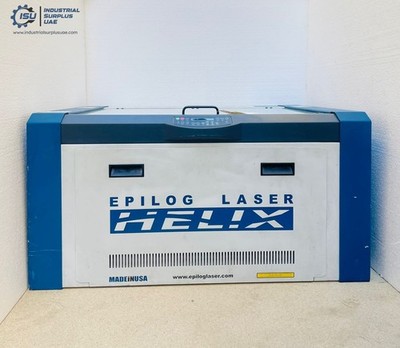
60 Watt Laser Engraver: What It Can Do and How to Choose One
A 60 watt laser engraver can offer a useful balance of power, speed, and versatility for workshops, small businesses, makers, and production environments. Depending on the laser type and machine design, it can engrave designs onto a range of materials and may also cut certain materials. Before choosing a machine, it helps to understand what “60 watts” means, which materials are suitable, and what features matter most.
What Does 60 Watts Mean?
The wattage describes the laser’s rated power, but it does not tell the whole story about a machine’s performance. Cutting ability and engraving quality also depend on the laser source, lens, focus, motion system, software, material, and settings.
It is also important to check whether a listing refers to the laser’s optical output or the machine’s electrical input. These are not the same. A 60-watt CO₂ laser and a 60-watt diode laser can behave very differently, so compare machines by laser type and verified optical power—not wattage alone.
What Can a 60 Watt Laser Engraver Do?
Many 60-watt machines are used to engrave text, logos, artwork, and patterns. Depending on the laser type and equipment, suitable materials may include:
- Wood and plywood
- Acrylic and some other plastics specifically rated for laser use
- Leather
- Paper, cardboard, and certain fabrics
- Glass and coated items, typically with the appropriate process or preparation
- Anodized aluminum and coated metals
A 60-watt CO₂ laser can often cut materials such as wood, acrylic, paper, and fabric within limits set by the machine and material. The thickness it can cut varies widely; a single “maximum cutting thickness” is not a reliable guide without knowing the material, machine configuration, and expected edge quality. Most standard CO₂ lasers do not directly engrave bare metal. Fiber lasers are generally better suited to marking or engraving many metals.
Never process an unknown material. PVC and vinyl can release hazardous, corrosive gases when exposed to a laser. Check the material manufacturer’s safety information and the engraver’s documentation before use.
Key Features to Compare
- Laser type: CO₂, diode, and fiber lasers are designed for different materials and tasks.
- Work area: Choose a bed size that fits the items you plan to make, with room for positioning and fixtures.
- Motion system: Stable rails, accurate belts or lead screws, and a rigid frame can support consistent results.
- Cooling: CO₂ laser tubes require appropriate cooling. Follow the manufacturer’s guidance on water temperature, flow, and maintenance.
- Air assist and exhaust: Air assist can help manage smoke and debris at the work surface. Proper exhaust is essential for removing fumes.
- Software and connectivity: Confirm that the machine works with your preferred design software and computer setup.
- Safety features: Look for suitable shielding or an enclosure, an emergency stop, interlocks where applicable, and clear operating instructions.
Safety and Ventilation
Laser engravers can cause serious eye and skin injuries and can start fires. Operate the machine according to its safety documentation, use the required protective equipment, and never leave an active laser unattended. Keep the workspace clear of combustible materials and have an appropriate fire response plan.
Use effective ventilation to move smoke and fumes outside or through a properly designed filtration system. An enclosure does not eliminate the need for ventilation. Check that the exhaust system is suitable for the materials being processed, and maintain filters and ducting as directed.
Getting Consistent Results
Start with the manufacturer’s recommended settings for your laser and material, then run small test samples. Focus the beam correctly, keep the material flat, and record settings that work well. Engraving speed, power, number of passes, and air-assist settings can all affect the finished result. For cutting, inspect the material and the back of the workpiece to make sure the beam has passed through cleanly without excessive scorching.
Is a 60 Watt Laser Engraver Right for You?
A 60-watt laser engraver may be a good fit if you need a capable machine for regular engraving and some cutting, but the right choice depends on your materials, production volume, workspace, and budget. Compare the laser type, usable work area, support, safety provisions, and verified performance. A well-matched machine—and careful setup—will matter more than the wattage number by itself.
5 Essential Safety Tips for Using a 60-Watt Laser Engraver
- Use laser-rated eye protection matched to the laser’s wavelength.
- Keep the lid closed and never leave the engraver unattended.
- Use ventilation to remove smoke and fumes.
- Focus the beam and test settings on scrap material first.
- Keep a suitable fire extinguisher nearby and clear of debris.
Use laser-rated eye protection matched to the laser’s wavelength.
Wear laser-rated eye protection designed for the specific wavelength and optical density of your 60-watt engraver. Ordinary safety glasses or eyewear made for a different laser may not provide adequate protection. Check the machine manufacturer’s guidance, use properly rated glasses even when the laser is enclosed if the instructions require them, and never look directly at the beam or its reflections.
Keep the lid closed and never leave the engraver unattended.
Keep the lid closed whenever your 60-watt laser engraver is operating, and never leave the machine unattended. The enclosure helps contain laser light, smoke, and debris, while staying nearby allows you to respond quickly if a fire, flare-up, or equipment problem occurs. Follow the manufacturer’s safety instructions and stop the machine before opening the lid or handling the material.
Use ventilation to remove smoke and fumes.
Use proper ventilation whenever you operate a 60-watt laser engraver to remove smoke, fumes, and airborne particles produced during engraving or cutting. Connect the machine to a suitable exhaust system that vents outdoors, or use a filtration system designed for the materials you’re processing. Keep vents and filters clean, and never assume an enclosure alone makes operation safe—some materials can release hazardous fumes when heated.
Focus the beam and test settings on scrap material first.
Before engraving or cutting your final piece, focus the laser beam according to the machine’s instructions and test the settings on a scrap piece of the same material. Small differences in thickness, finish, or composition can affect the result, so testing helps you adjust power and speed, avoid scorching or incomplete cuts, and get a cleaner, more consistent finish.
Keep a suitable fire extinguisher nearby and clear of debris.
Keep a suitable fire extinguisher nearby whenever you use a 60-watt laser engraver, and make sure it’s easy to reach—not blocked by materials, tools, or other debris. Laser engraving can ignite wood, paper, and other combustible materials, so stay with the machine while it’s running and know how to respond safely if a fire starts. Follow the engraver manufacturer’s safety guidance and local fire-safety recommendations.
No Responses